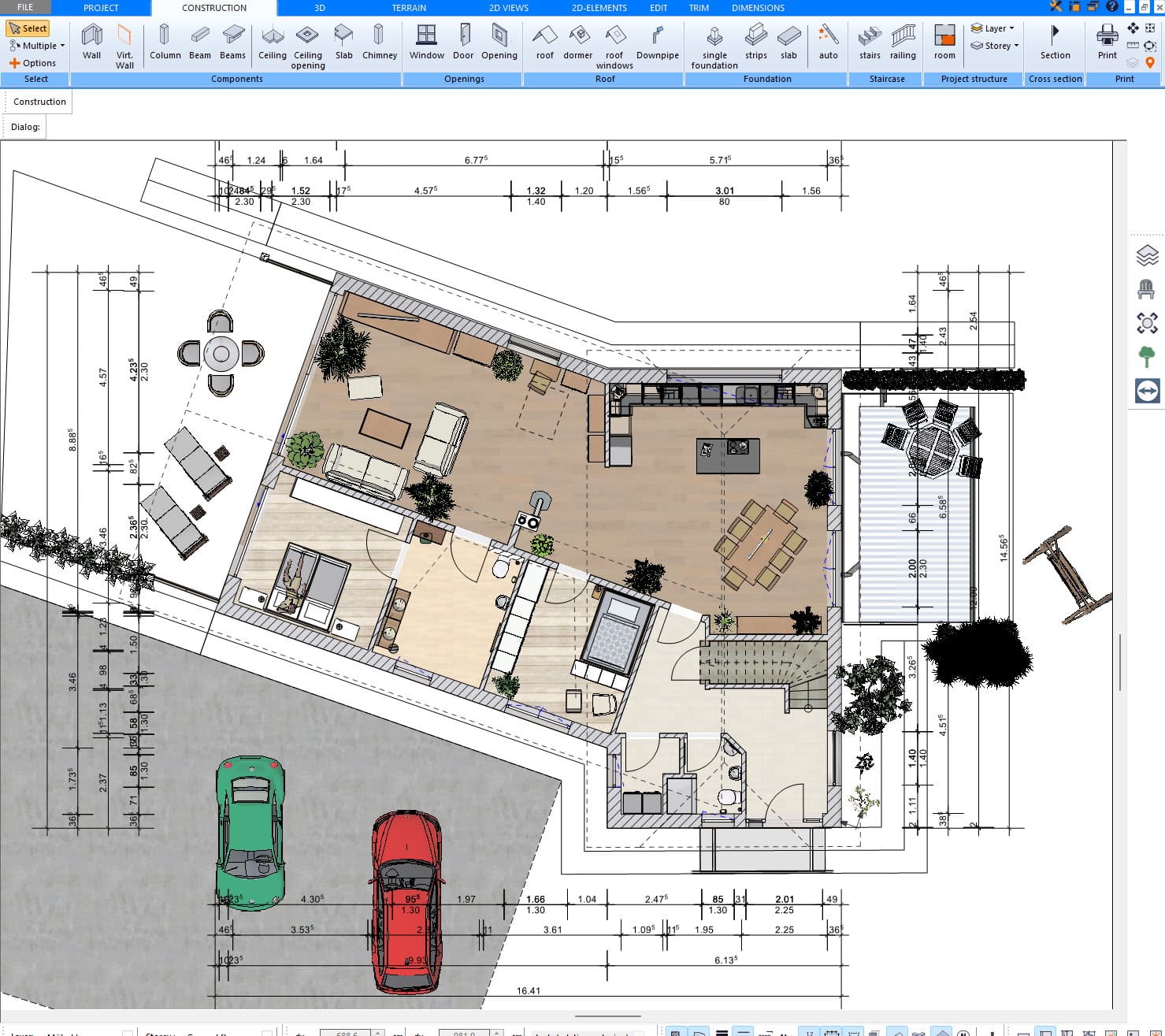
Yes, Plan7Architect is very well suited for users in Denmark. It can be used to create detailed 2D floor plans, 3D house models, elevations, sections, plan sheets and technical drawings for Danish home projects, renovations, extensions, summer houses, garages, terraces and new residential concepts.
Denmark is a very good fit for Plan7Architect because many residential projects are practical, detailed and highly individual. A family house near Copenhagen, a townhouse in Aarhus, a villa in Odense, a rural property, a summer house on the coast, an older brick home, a compact city lot or a garage extension can all require different layouts, dimensions and planning ideas.
Plan7Architect is not limited to one fixed national template. You can create the project with your own measurements, wall structures, roof shapes, doors, windows, rooms, floors and details.
A practical planning tool for Danish homes
Many Danish homeowners are not only planning completely new houses. They often want to improve an existing property, modernise an older home, add more living space, redesign the interior layout or plan a better connection between the house and outdoor areas.
Plan7Architect is useful for projects such as:
home renovations
house extensions
kitchen and living room redesigns
garage and carport planning
terrace planning
summer house projects
older home modernisation
roof and exterior concepts
compact floor plan optimisation
interior wall changes
guest room or home office planning
new home concepts
The software helps you turn ideas into clear 2D and 3D plans before the project becomes expensive.
Metric measurements are fully supported
Plan7Architect can be used with metric measurements, which makes it suitable for Denmark.
You can work with metres, centimetres and millimetres and enter exact values for walls, rooms, ceiling heights, windows, doors, stairs, openings, roof elements and other parts of the building.
This is important for Danish projects because many homes require precise planning. Whether you are recreating an existing house, planning an extension, drawing a summer house or testing a garage layout, you can enter the exact dimensions required for your project.
The measurement settings can also be adjusted later when needed, so you can continue working flexibly inside your project.
Suitable for Danish villas, townhouses and family homes
Danish homes can vary a lot depending on location and property type. A detached villa, townhouse, older brick house, modern family home, rural property or coastal summer house can all have different planning needs.
Plan7Architect works well for these situations because it allows you to create the building from your own measurements instead of forcing you into predefined templates.
You can plan:
detached houses
villas
townhouses
row houses
summer houses
family homes
garages
carports
terraces
extensions
interior redesigns
existing buildings
This makes the software especially useful for users who want to test ideas clearly before speaking with builders, carpenters or other professionals.
Useful for summer houses and coastal homes
Summer houses are an important part of many Danish property projects. These homes often need practical layouts, outdoor access, terraces, simple room structures, good light, storage areas and flexible living spaces for family use.
Plan7Architect is very useful for planning summer houses because you can test the layout in 2D and 3D before building or renovating.
You can plan:
compact living areas
kitchen and dining spaces
bedrooms
bathrooms
storage rooms
entrances
terraces
large window positions
roof shapes
outdoor access
guest spaces
different layout versions
This is helpful whether you are renovating an existing summer house, modernising an older coastal property or planning a new holiday home concept.
Helpful for compact lots and smart floor plans
In many Danish towns and cities, space must be used intelligently. A compact plot, townhouse, row house or smaller family home needs a clear layout before work begins.
Plan7Architect helps you test how to use the available space.
You can compare ideas such as:
opening the kitchen to the living area
adding a small extension
creating a home office
improving storage
changing room sizes
adding another bedroom
redesigning the entrance
improving the bathroom layout
adjusting windows and doors
connecting the house better to the terrace or garden
This makes the software useful for projects where every square metre matters.
Good for extensions and modernising older homes
Many Danish homeowners want to renovate or extend an existing house instead of starting from scratch.
Plan7Architect is ideal for this because you can first recreate the current building and then test different versions of the future layout.
You can explore ideas such as:
adding more living space
extending the kitchen
opening up rooms
changing internal walls
adding a terrace
adding a garage or carport
changing windows and doors
modernising an older floor plan
improving natural light
redesigning the entrance
testing several renovation options
This makes it easier to understand what works before you talk to builders, order materials or make expensive decisions.
Useful for terraces, gardens and indoor-outdoor living
Terraces and garden-facing living areas are important in many Danish homes. A good terrace can change how the house is used, especially during spring and summer.
Plan7Architect helps you plan how these areas connect to the building.
You can test:
terrace size
access from the living room
door and window positions
covered outdoor areas
garden connection
outdoor stairs
different terrace layouts
privacy and orientation ideas
how an extension changes the outdoor space
This is useful for family homes, summer houses, coastal homes and renovation projects where the connection between inside and outside matters.
Suitable for garages, carports and storage buildings
Garages, carports and storage buildings are common planning topics in Denmark. They often need to fit neatly with the house, driveway, entrance and property layout.
Plan7Architect can be used to plan these structures clearly.
You can test:
single garages
double garages
carports
storage rooms
workshop areas
garage extensions
roof shapes
doors and openings
placement beside the house
access from the driveway
connection to the entrance
A garage or carport is often more than a separate structure. It affects the full property layout. Plan7Architect helps you visualise this before work starts.
Custom Danish window and door sizes can be entered manually
A common question is whether Plan7Architect includes specific Danish windows, doors or building components.
Plan7Architect does not depend on one fixed “Danish window catalogue” or one predefined set of door sizes. That is an advantage, because real homes do not all use the same dimensions.
In the software, you choose the type of element you need and then enter the exact width, height, position and other values yourself.
This is especially useful for:
older houses
brick homes
renovations
summer houses
extensions
custom window layouts
garage doors
townhouses
modernisation projects
If you use certain elements regularly, you can also save them and reuse them later. This makes the software much more flexible than relying only on fixed catalogue presets.
Useful for energy renovation and modernisation planning
Many Danish home projects are not only about more space. They are also about improving comfort, updating older layouts, changing windows, improving wall structures, redesigning rooms or preparing a house for modern living.
Plan7Architect can help you visualise these changes before work begins.
You can plan:
new window positions
changed wall layouts
improved room arrangements
modernised kitchens
better bathroom layouts
extensions with more daylight
wall structures
roof and exterior concepts
sections and elevations
additional drawing details
This gives you a clearer overview before discussing the project with builders, carpenters or renovation specialists.
Useful before speaking with builders, carpenters or architects
Plan7Architect is very helpful before speaking with builders, carpenters, architects or other professionals.
Many homeowners have ideas, but those ideas are often difficult to explain with only words, photos or rough sketches.
With Plan7Architect, you can create a visual plan first.
This can help you:
explain your idea more clearly
compare different layout versions
show your family what you are planning
prepare better before contacting builders
reduce misunderstandings
visualise the project in 3D
create clearer plan documents
understand the project before spending more money
The software helps you move from a vague idea to a clear plan that others can understand.
Useful for small building companies and carpenters in Denmark
Plan7Architect is also suitable for small building companies, carpenters, renovation businesses and contractors in Denmark.
Many smaller companies need a practical way to present ideas to customers without using overly complicated CAD software for every early planning discussion.
Plan7Architect can help create clear 2D and 3D plans for:
renovations
extensions
summer houses
garages
carports
terraces
interior changes
roof concepts
customer presentations
early project planning
For small companies, the benefit is simple: customers understand a project much faster when they can see it.
Floor plans, elevations, sections and plan sheets
Plan7Architect is not just a simple room planner. It can create detailed visual and technical planning documents.
You can create:
2D floor plans
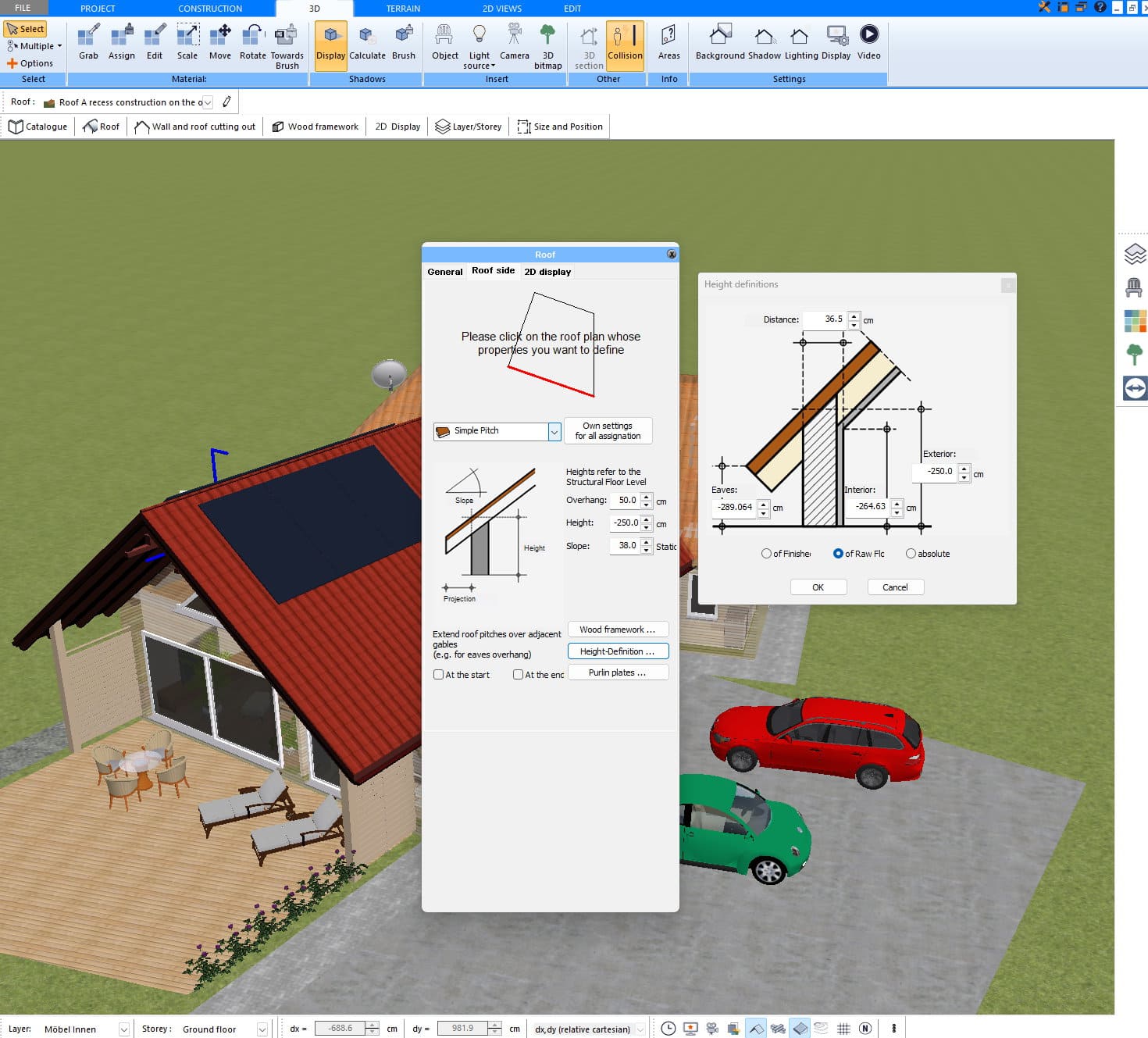
3D building models
elevations
sections
roof designs
wall structures
room layouts
dimensioned drawings
plan sheets
title blocks
labels
annotations
hatching
symbols
custom 2D details
This is important for Danish projects because houses, summer houses, extensions, garages and terraces often need more than a simple room sketch. You may want to show room sizes, wall positions, openings, roof shapes, exterior views, section views, floor levels or additional details.
Wall structures and detailed planning
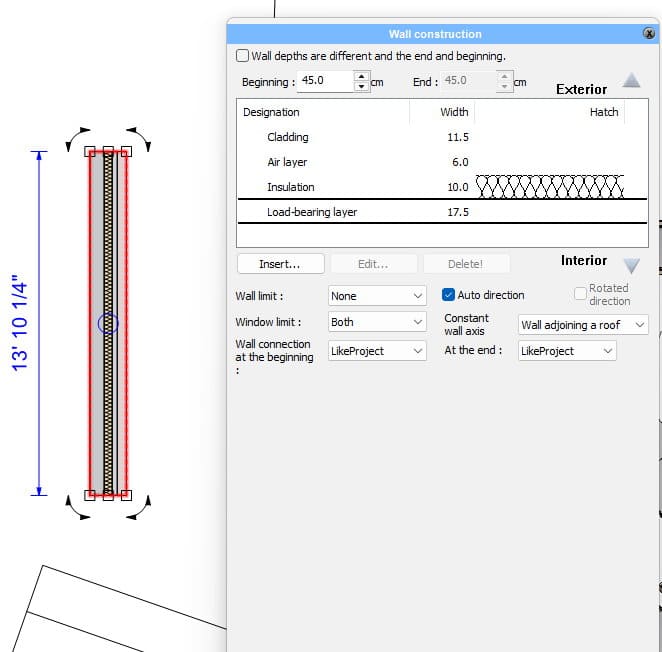
Danish homes often involve brick walls, timber elements, insulated exterior walls, layered wall structures, interior walls and practical building details.
Plan7Architect gives you tools to work with wall structures and wall layers, which makes it useful for creating more detailed concepts.
You can define walls, adjust dimensions, work with different wall types and add additional details manually when needed.
This is helpful when planning:
brick houses
wooden summer houses
extensions
renovations
exterior walls
interior walls
section drawings
wall build-up concepts
The software gives you a flexible basis for representing the project clearly.
Manual details can be added when needed
Every project is different. That is why Plan7Architect includes manual drawing tools.
If you need to add additional information to a floor plan, elevation or section, you can use 2D drawing elements to add lines, labels, dimensions, notes, markings, hatching and symbols.
This is useful when a drawing needs more information than the automatic model provides.
You can add:
extra dimensions
explanatory notes
detail lines
hatching
legends
markings
labels
custom 2D elements
This makes it easier to adapt the plan to the exact project instead of being limited to automatic output only.
Export your plans as PDF, DWG and DXF
Plan7Architect supports important export formats, including PDF, DWG and DXF.
PDF is useful when you want to share your plans with family members, builders, carpenters, contractors or project partners.
DWG and DXF are useful when you want to continue working with the plan in CAD workflows or share the file with someone who uses CAD software.
This makes Plan7Architect practical for both visual planning and project communication.
One-time payment instead of monthly subscription costs
Many users in Denmark do not want another monthly software subscription, especially if they only need the software for one house, summer house, garage, terrace or renovation project.
Plan7Architect is available as a one-time purchase. This makes it attractive for homeowners and small businesses who want practical planning software without ongoing monthly costs.
You can use the software for your project, create plans, test ideas, export files and continue working without being locked into a subscription model.
Why Plan7Architect works well for Denmark
Plan7Architect is a strong choice for Danish users because it fits many real project situations: existing homes, summer houses, compact lots, terraces, garages, extensions and detailed renovation planning.
The main advantages are:
metric measurements
exact custom dimensions
suitable for villas, townhouses, summer houses and family homes
useful for compact lots and smart floor plan planning
suitable for terraces, garages and carports
good for extensions and modernising older homes
useful for wall structures and detailed planning
helpful before speaking with builders or carpenters
2D and 3D planning in one software
floor plans, elevations and sections
plan sheets, labels, dimensions and custom details
PDF, DWG and DXF export
one-time payment instead of monthly subscription costs
Conclusion: Is Plan7Architect suitable for Denmark?
Yes, Plan7Architect is suitable for Denmark.
It is a flexible 2D and 3D planning tool for homeowners, summer house owners, renovators, property buyers, small builders, carpenters and contractors who want to plan residential projects more clearly.
It works well for Danish projects because it supports metric measurements, custom dimensions, detailed floor plans, elevations, sections, roof planning, summer houses, garages, terraces, extensions and existing homes.
Plan7Architect is not limited to fixed catalogue sizes or one specific building style. You can adapt the plan to your own property, your own measurements and your own project.
If you are in Denmark and want to plan a house, summer house, renovation, extension, garage, carport, terrace, compact floor plan or new home concept, Plan7Architect is an excellent choice.
You don’t need any prior experience because the software has been specifically designed for beginners. The planning process is carried out in 5 simple steps:
1. Draw Walls
Create your 2D floor plan by accurately drawing and adjusting rooms and walls for your home design.
2. Windows & Doors
Optimize your space layout with perfectly fitting door and window elements.
3. Floors & Roof
Visualize different levels and roof types for your home design.
4. Textures & 3D Objects
Choose materials and textures to customize floors, walls, and 3D objects individually for a realistic representation of your design.
5. Plan for the Building Permit
Create professional construction drawings with elevations, sections, and complete plan compilations.
6. Export the Floor Plan as a 3D Model for Twinmotion
Visualize your project with cutting-edge 3D technology and create high-quality image renderings and videos using Twinmotion by Epic Games.
– Compliant with international construction standards