

Software for Residential Construction – Plan7Architect

Plan7Architect is professional residential construction software designed to create complete house plans, construction drawings, and 3D models without requiring an expensive CAD subscription. If you are planning a single-family home, a multi-story residence, a basement house, or a renovation project, the software provides all essential tools in one environment.

You can create:

  • Detailed 2D floor plans

  • Automatic sections and elevations

  • Roof plans with adjustable pitch

  • Construction-ready drawings

  • Real-time 3D visualizations

  • Printable and exportable plans in PDF, DWG, and DXF

The software is suitable for homeowners, builders, contractors, and residential designers who need professional documentation without investing several thousand dollars in high-end architectural software.

From practical experience, what makes Plan7Architect particularly effective for residential construction is the combination of simplicity and depth. You can start by drawing walls and rooms within minutes, yet you are still able to define wall thickness, ceiling heights such as 8 ft, 9 ft, or 10 ft, or 2.4 m, 2.7 m, or 3 m, adjust structural elements, and create detailed roof structures.

The software supports both imperial and metric units. You can switch between American and European measurement systems inside the settings at any time, which makes it suitable for projects in the United States, Canada, Australia, the United Kingdom, and throughout Europe.

Plan7Architect is a one-time purchase. There are no recurring subscription fees and no locked features behind additional payments. Once installed, you can plan residential construction projects long term without financial pressure.

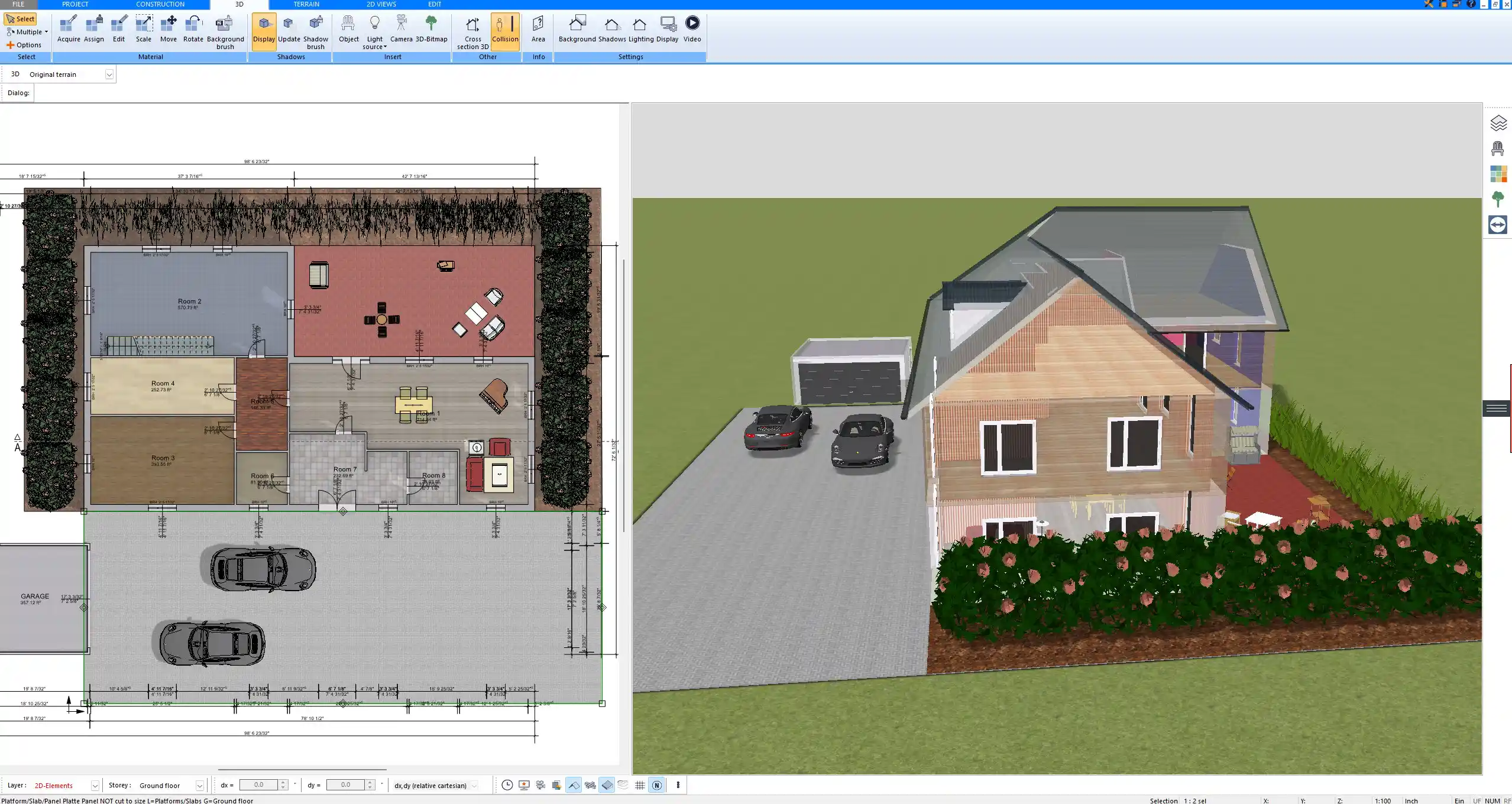
Floor plan created with Plan7Architect residential construction software

Who Is Residential Construction Software For?

Homeowners Planning a New House

If you are planning your own home, you quickly realize how difficult it is to communicate ideas using only sketches on paper. Residential construction software allows you to:

  • Test different room layouts

  • Adjust wall positions and dimensions precisely

  • Visualize ceiling heights and roof shapes

  • Detect planning mistakes early

  • Present clear drawings to builders or architects

Many homeowners start by sketching floor plans on grid paper. The problem arises when dimensions need to change or when you want to see how a 10 ft ceiling feels compared to 9 ft, or how a 2.7 m ceiling compares to 2.5 m. In Plan7Architect, you simply modify the value and instantly see the impact in both 2D and 3D.

If you later decide to involve a licensed architect or engineer, you can export your plans in DWG or DXF format, allowing professionals to continue working with your design.

Builders and Contractors

For builders and contractors, clear construction drawings are essential. Misunderstandings between trades can lead to expensive delays. With residential construction software, you can:

  • Generate floor plans with exact dimensions

  • Create sections that show structural details

  • Produce elevation views for façade discussions

  • Adjust layouts during construction phases

In practice, having a digital model helps when clients request changes. Instead of redrawing everything manually, you adjust walls, openings, or ceiling heights, and the software updates associated views.

Residential Designers and Draftspersons

If you work professionally in residential design, cost efficiency matters. High-end CAD systems often require subscriptions costing thousands per year. Plan7Architect offers a practical alternative for residential projects where you need:

  • Professional plan layout

  • Accurate dimensioning

  • Exportable construction documentation

  • Multi-story planning

You can produce permit-ready drawings and provide them to engineers for structural verification and stamping.

Core Features for Residential Construction

Two-Dimensional Floor Plan Creation

The foundation of every residential construction project is the floor plan. Plan7Architect allows you to draw walls interactively, define thickness, and adjust dimensions precisely.

Key floor plan capabilities include:

  • Exterior and interior wall drawing

  • Adjustable wall thickness

  • Door and window insertion

  • Automatic dimension lines

  • Room labeling and area calculation

  • Multi-story planning

You can design single-level homes or multi-story buildings with basements. For example, you may define a ground floor with 9 ft ceilings and an upper floor with 8 ft ceilings, or 2.7 m and 2.4 m respectively.

Automatic building section generated in Plan7Architect

Measurement units can be set to imperial or metric depending on your project requirements.

Practical tip:

If you activate interactive dimension tools, you can modify room sizes directly by clicking on dimension lines. This speeds up layout adjustments significantly during early planning phases.

Automatic Sections and Elevations

Residential construction requires more than floor plans. Sections and elevations are critical for understanding structure and exterior appearance.

Plan7Architect automatically generates:

  • Building sections

  • Exterior elevations

  • Roof cross-sections

If you change wall height, roof pitch, or floor level, sections update accordingly. This is particularly helpful when designing:

  • Homes with vaulted ceilings

  • Split-level houses

  • Basement constructions

  • Barn-style roofs

You can define roof pitch in degrees or percentage and adjust ridge heights precisely. Ceiling heights such as 10 ft or 3 m can be modified at any time, and the impact is immediately visible in sectional views.

Roof Construction Tools

Roof design is often the most complex part of residential construction. Plan7Architect includes dedicated tools for common residential roof types:

  • Gable roofs

  • Hip roofs

  • Shed roofs

  • Mansard roofs

  • Custom roof shapes

You can insert dormers, adjust overhangs, and define roof pitch individually for different sections of the building. For complex roof geometry, the software calculates intersections automatically.

From experience, this dramatically reduces errors compared to manual drafting, especially for multi-level roof designs.

Three-Dimensional Visualization

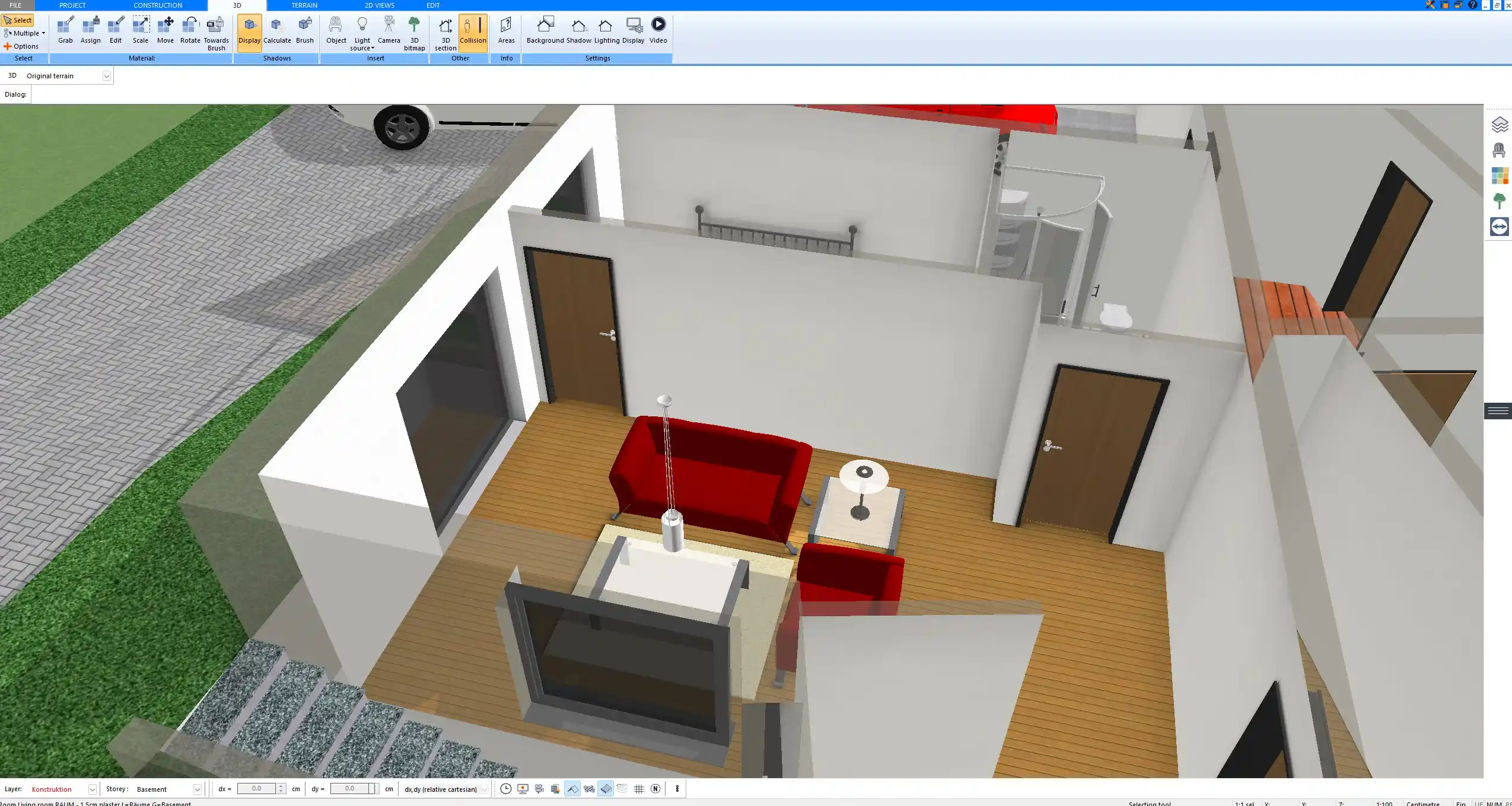
Every 2D plan is automatically converted into a 3D model. This is essential for:

  • Checking proportions

  • Evaluating window placement

  • Reviewing façade design

  • Presenting projects to clients

You can navigate the house in real time, switch to interior views, and adjust materials. Exterior walls, roofing materials, flooring, and façade finishes can be modified visually.

For homeowners, this is often the first time they truly understand how their future home will look. For professionals, it reduces revision cycles because clients can see design implications clearly.

Construction Documentation and Export

Residential construction software must provide professional output. Plan7Architect allows you to:

  • Print scaled floor plans

  • Create printable plan layouts

  • Export to PDF

  • Export to DWG and DXF

The following table summarizes common output formats:

Format | Typical Use
PDF | Client presentations and permit submission
DWG | Collaboration with architects and engineers
DXF | Import into other CAD systems
Printed plans | On-site construction reference

You can arrange drawings on sheets with title blocks and scale settings appropriate for residential construction documentation.

Measurement Systems and International Use

Plan7Architect supports both imperial and metric measurement systems. You can switch units inside the software settings depending on whether your project is located in the United States, Canada, Australia, the United Kingdom, or Europe.

You can define:

  • Wall thickness in inches or millimeters

  • Ceiling heights in feet or meters

  • Room dimensions in feet and inches or meters and centimeters

There is no need to convert values manually. The software adapts to your selected unit system.

Residential standards differ slightly between countries, but the structural planning logic remains universal. Plan7Architect allows enough flexibility to adjust layouts, heights, and structural components according to local building requirements.

Real-time 3D house visualization created with Plan7Architect

How Plan7Architect Compares to Other Residential Construction Software

Compared to Expensive CAD Systems

High-end architectural CAD software typically offers extensive features but comes with:

  • High purchase prices

  • Annual subscriptions

  • Complex interfaces

  • Long learning curves

Plan7Architect focuses specifically on residential construction. It includes the necessary tools without overwhelming users with industrial-level complexity.

Advantages over high-end systems:

  • One-time purchase

  • Faster onboarding

  • Simplified residential workflow

  • No subscription dependency

Compared to Simple Floor Plan Apps

Basic floor plan apps allow you to sketch rooms but usually lack:

  • Construction sections

  • Professional export formats

  • Multi-story functionality

  • Detailed roof construction

Plan7Architect goes beyond simple sketching. You can create full construction drawings suitable for submission and collaboration with licensed professionals.

Typical Residential Projects You Can Create

Plan7Architect is suitable for a wide range of residential projects:

  • Single-family homes

  • Two-story houses

  • Homes with basements

  • Garage buildings

  • Extensions and remodels

  • Barn-style houses

  • Container homes

  • Small residential developments

Whether you are designing a compact house of 1200 sq ft or 110 sq m, or a larger home of 3000 sq ft or 280 sq m, the planning process remains structured and manageable within the software.

Does Plan7Architect Create Stamped Plans?

Plan7Architect creates construction drawings and planning documentation. However, stamping must be performed by a licensed local architect or engineer according to regional regulations.

Typical workflow:

  1. Create construction drawings in Plan7Architect.

  2. Export plans in PDF, DWG, or DXF format.

  3. Submit drawings to a licensed professional.

  4. Obtain structural review and official stamping if required.

The software is a planning and drafting tool. Legal approval remains the responsibility of certified professionals in your jurisdiction.

Learning Curve and Support

Residential construction software should not feel like an engineering challenge. Plan7Architect is designed to be accessible while still offering professional tools.

In practice, most users:

  • Learn basic wall drawing within the first hour

  • Understand floor plan editing after several practice sessions

  • Gain confidence with sections and roofs after watching tutorial videos

Support resources typically include:

  • Video tutorials

  • Documentation

  • Support ticket system

If you dedicate several hours to structured learning, you can produce complete residential floor plans and elevations without prior CAD experience.

Advantages for Residential Construction Projects

Plan7Architect offers the following advantages for residential construction planning:

  • One-time purchase

  • Complete construction documentation

  • Real-time 3D modeling

  • Adjustable wall systems

  • Flexible roof design tools

  • Multi-story planning capability

  • Imperial and metric unit support

  • Export formats compatible with engineers

The software combines affordability, professional output, and ease of use in one system specifically tailored for residential construction.

Conclusion: Is Plan7Architect the Right Residential Construction Software?

If you are looking for software for residential construction that allows you to create professional floor plans, sections, elevations, and 3D visualizations without recurring subscription fees, Plan7Architect is a practical solution.

It supports both imperial and metric units, works for international residential projects, and provides export formats compatible with licensed architects and engineers. Whether you are a homeowner planning your first house or a professional drafting residential projects, the software delivers a complete workflow from concept to construction documentation.

Plan your project with Plan7Architect

Plan7Architect Pro

Plan7Architect Pro 5 for $119.99

You don’t need any prior experience because the software has been specifically designed for beginners. The planning process is carried out in 5 simple steps:

1. Draw Walls

Create your 2D floor plan by accurately drawing and adjusting rooms and walls for your home design.

2. Windows & Doors

Optimize your space layout with perfectly fitting door and window elements.

3. Floors & Roof

Visualize different levels and roof types for your home design.

4. Textures & 3D Objects

Choose materials and textures to customize floors, walls, and 3D objects individually for a realistic representation of your design.

5. Plan for the Building Permit

Sections and views for the building application can be created with Plan7Architect (1)
Create professional construction drawings with elevations, sections, and complete plan compilations.

6. Export the Floor Plan as a 3D Model for Twinmotion

Visualize your project with cutting-edge 3D technology and create high-quality image renderings and videos using Twinmotion by Epic Games.


  • – Compliant with international construction standards
  • – Usable on 3 PCs simultaneously
  • – Option for consultation with an architect
  • – Comprehensive user manual
  • – Regular updates
  • – Video tutorials
  • – Millions of 3D objects available

Why Thousands of Builders Prefer Plan7Architect

Why choose Plan7Architect over other home design tools?

14-Day Money-Back Guarantee
No questions asked. Just email us within 14 days if you’re not satisfied.
One-time payment – no subscription
Own the software forever. No hidden costs. No monthly fees. Updates are optional.
Based on $2,500 professional architecture software
Plan7Architect is an optimized version — used by professionals and private users alike.
Supports international building standards
Adaptable to US, UK, Canadian, Australian, and European requirements.
Works offline – use on up to 3 devices
No internet required. Install on up to 3 computers – ideal for home and office use.
Metric & imperial units
Switch freely between feet/inches or meters/centimeters — perfect for global use.
++
All key export/import formats included
DWG, DXF, OBJ, 3DS, STL, PDF, image export/import, and SketchUp import — for smooth collaboration.
ii
Create real building permit documents
Generate floor plans, elevations, cross-sections, and full construction drawings.
Supports wood framing for walls and roofs
Design wall and roof structures, gables, dormers, and freely constructed wood frameworks.
Easy learning curve with full support
Includes video tutorials, ticket system, detailed PDF manual, sample projects, and access to our customer forum.
Excellent verified reviews
Top ratings on Trusted Shops and Amazon.
Ongoing development – 3–4 updates per year
Always improving, with a modern 3D engine and regular feature upgrades.

Watch how a complete house is planned from start to finish – in under 25 minutes

Detailed House Planning (25 Min)

Small Home Planning Demo (12 Min)

The 3 Plan7Architects

Sale!
Plan7Architect Pro
Original price was: $259.99.Current price is: $119.99.

Verified Customer Reviews

Verified Customer Reviews

Trusted Shops:

Home » Architecture software » Software for Residential Construction – Plan7Architect
Youtube
Select your currency
