

If you are looking for reliable software for draftsmen that allows you to create precise 2D construction drawings, sections, elevations and detailed residential plans without committing to expensive subscriptions, Plan7Architect is a practical and cost-efficient solution for residential drafting.
It provides:
-
Precise 2D drafting tools for floor plans
-
Automatic generation of sections and elevations
-
Editable construction elements such as walls, roofs, foundations and stairs
-
DWG and DXF import and export
-
PDF export for permit and construction documentation
-
Switchable metric and imperial units
-
One-time purchase instead of a recurring subscription
From my experience, the software is particularly suitable for independent draftsmen, residential designers and contractors who need professional construction drawings but do not require a full enterprise-level BIM coordination system.
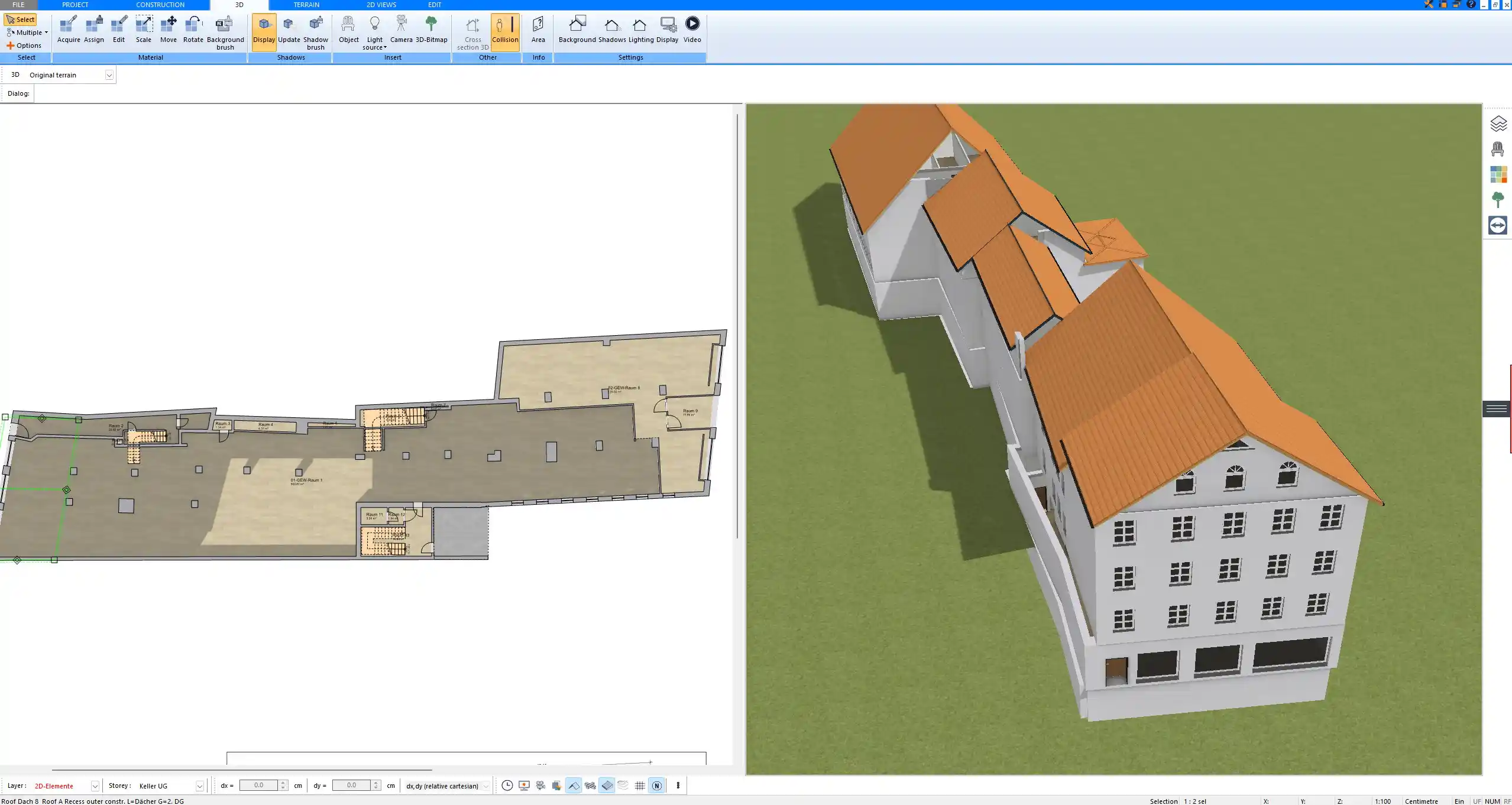
What Draftsmen Actually Need from Software
Professional drafting software must meet clear technical requirements. A visually appealing interface is not enough. What matters is precision, control and output quality.
Precision and Technical Accuracy
As a draftsman, you need absolute dimensional control. Every wall thickness, every opening, every structural element must be defined exactly. Plan7Architect allows you to:
-
Enter exact dimensions manually
-
Adjust wall thicknesses precisely
-
Define custom wall structures
-
Modify ceiling heights such as 2.70 m or 9 ft, 3.00 m or 10 ft and beyond
-
Snap elements accurately to grids and reference lines
Interactive dimension tools allow you to modify lengths directly inside the drawing. You can activate dimension editing for entire walls or individual wall segments, which significantly speeds up adjustments.
Units can be switched between metric and imperial at any time inside the software, making it suitable for both European and North American workflows.
Professional Documentation
Drafting software must produce more than conceptual layouts. It must generate construction-ready documentation.
With Plan7Architect you can create:
-
Detailed floor plans
-
Building sections
-
Exterior elevations
-
Roof plans
-
Foundation layouts
-
Printable scaled drawings
Sections and elevations are generated from the 3D model and can be refined manually. This reduces repetitive work while keeping full control over the final drawing layout.
For print output, you can define drawing scales appropriate for construction documentation.
File Compatibility
Interoperability is critical in real-world projects. You will often collaborate with architects, engineers or contractors who work in other CAD systems.
Plan7Architect supports:
-
DWG import
-
DXF import
-
DWG export
-
DXF export
-
PDF export
This allows you to:
-
Import existing CAD base drawings
-
Export your plans for further engineering refinement
-
Provide files for permit submission
In practice, I have found DWG export especially useful when structural engineers need to continue working in their preferred CAD environment.
Flexible Measurement Systems
International drafting requires flexibility in measurement units. Some projects use millimeters or meters, others feet and inches.
Plan7Architect allows you to:
-
Switch between metric and imperial units
-
Display dimensions according to local standards
-
Adjust measurement precision
There is no need for manual conversion. The system adapts to your preferred unit setup.

What Is Plan7Architect?
Plan7Architect is professional house planning and drafting software designed primarily for residential construction projects. It is built on a CAD-level architectural engine but structured in a way that makes it accessible for practical use.
It combines:
-
2D drafting
-
3D modeling
-
Automatic section and elevation generation
-
Construction detailing
The focus is clearly on residential buildings rather than large commercial BIM coordination.
Unlike many high-end CAD systems, it does not rely on subscription licensing. It is purchased once and can be used long term without recurring payments.
Core Drafting Features in Plan7Architect
2D Construction Drafting
The 2D drafting environment allows you to:
-
Draw walls with exact thickness values
-
Define custom wall layers
-
Insert doors and windows with adjustable dimensions
-
Edit dimensions interactively
-
Work with snapping and alignment tools
-
Manage layers for different drawing elements
Walls can be defined with structural layers, insulation and finishing materials. You are not limited to predefined templates. This is particularly useful when working with regional construction methods.
Automatic Sections and Elevations
Once the 3D model is created, sections and elevations can be generated automatically.
You can:
-
Define custom section lines
-
Create multiple section views
-
Generate elevation views for all facades
-
Adjust graphical presentation
Because the views are linked to the model, updates in the floor plan reflect in sections and elevations. This significantly reduces manual redrawing effort.
Detailed Construction Elements
Residential drafting requires more than simple lines. Plan7Architect includes detailed construction components:
-
Multi-layer wall definitions
-
Roof construction with adjustable pitch
-
Foundations and slab configurations
-
Staircase design with customizable dimensions
-
Ceiling height adjustments
-
Openings with lintel and sill height control
For example, you can define a roof pitch appropriate for local requirements and adjust ridge heights accordingly. Ceiling heights can be set according to project needs, whether that means 2.40 m, 2.70 m, 9 ft or 10 ft.
DWG and DXF Workflow
For many draftsmen, DWG compatibility is essential.
Typical workflow:
-
Import an existing DWG floor plan
-
Trace or adapt structural elements
-
Add detailed architectural layers
-
Export final drawings in DWG format
This allows you to integrate Plan7Architect into an existing professional workflow rather than replacing your entire CAD environment.

Comparison: Plan7Architect vs Typical Drafting Software
| Feature | Plan7Architect | High-End CAD Systems |
|---|---|---|
| Licensing Model | One-time purchase | Subscription |
| Primary Focus | Residential drafting | Broad multi-discipline |
| 2D Drafting | Yes | Yes |
| 3D Modeling | Integrated | Yes |
| Automatic Sections | Yes | Yes |
| Advanced BIM Coordination | Limited | Extensive |
| Learning Curve | Moderate | Steep |
| Cost Barrier | Low | High |
High-end CAD systems offer advanced BIM coordination and structural calculation integration, which are often required for large commercial projects. For residential drafting, these features are not always necessary.
Who Is Plan7Architect Suitable For?
Ideal For
Plan7Architect works particularly well for:
-
Independent draftsmen
-
Residential designers
-
Remodeling professionals
-
Contractors creating technical drawings
-
Self-employed planning professionals
-
International users working with metric or imperial units
If your primary work involves residential buildings, renovations or extensions, the software provides all necessary drafting tools.
Not Ideal For
It is not designed as:
-
A full BIM coordination platform for large commercial buildings
-
Structural calculation software
-
Multi-disciplinary engineering integration software
For large-scale commercial developments requiring complex BIM workflows, enterprise-level systems remain more appropriate.
International Use – US and European Drafting
Plan7Architect is not restricted to a specific country. You can use it internationally for residential drafting.
The software allows:
-
Switching between metric and imperial measurement systems
-
Adjusting dimensions according to local standards
-
Creating drawings suitable for local permit submission
Permit stamping and final approval must always be handled by a licensed professional in the respective region, but the drawing production itself can be done within the software regardless of location.
How Draftsmen Typically Use Plan7Architect in Practice
A practical workflow often looks like this:
-
Create the initial floor plan layout
-
Define wall types and thicknesses
-
Insert doors, windows and structural openings
-
Adjust ceiling heights and roof structure
-
Generate sections and elevations
-
Refine dimensions and drawing layout
-
Export to DWG or PDF for submission
Because sections and elevations are generated from the model, adjustments to the floor plan automatically update related views.
Tip
When starting a project, define your wall types and construction layers early. This ensures consistency throughout sections and elevations and reduces correction work later.
Advantages for Independent Professionals
Independent draftsmen benefit from predictable cost structures.
Plan7Architect offers:
-
One-time purchase
-
No recurring subscription fees
-
No in-app purchases
-
Full feature access after purchase
-
Offline functionality
This eliminates financial pressure caused by monthly software costs. You retain access to your projects without dependency on cloud licensing systems.
Limitations to Be Aware Of
Every drafting tool has boundaries.
Plan7Architect does not provide:
-
Advanced multi-disciplinary BIM coordination
-
Integrated structural load calculation modules
-
Large-scale infrastructure modeling
Its focus remains residential architectural drafting rather than complex engineering ecosystems.
Final Verdict – Is Plan7Architect Good Software for Draftsmen?
If your work focuses on residential construction drafting, permit-ready floor plans, sections and elevations, Plan7Architect is a capable and cost-efficient drafting solution.
It provides precise 2D drafting tools, automatic view generation, DWG compatibility and international unit flexibility without subscription commitments.
For large commercial BIM projects with extensive coordination requirements, enterprise-level CAD systems remain more suitable. For independent draftsmen and residential designers, Plan7Architect delivers the essential drafting functionality required for professional construction documentation.
Plan your project with Plan7Architect

Plan7Architect Pro 5 for $109.99
You don’t need any prior experience because the software has been specifically designed for beginners. The planning process is carried out in 5 simple steps:
1. Draw Walls

2. Windows & Doors

3. Floors & Roof

4. Textures & 3D Objects

5. Plan for the Building Permit

6. Export the Floor Plan as a 3D Model for Twinmotion

- – Compliant with international construction standards
- – Usable on 3 PCs simultaneously
- – Option for consultation with an architect
- – Comprehensive user manual
- – Regular updates
- – Video tutorials
- – Millions of 3D objects available
Why Thousands of Builders Prefer Plan7Architect
Why choose Plan7Architect over other home design tools?


