

Software for Contractors – Plan7Architect

If you are looking for reliable software for contractors that allows you to create professional floor plans, construction drawings, sections, elevations and 3D visualizations without the complexity of enterprise BIM systems, Plan7Architect is a practical and cost-effective solution.

Plan7Architect enables you to design residential and light commercial projects with precise dimensions, adjustable wall constructions, roof planning tools and detailed layouts. It is a one-time purchase solution, supports both metric and imperial units, and is suitable for remodeling, new construction and additions. You can create clean, professional plans that are ready for client presentation and preparation for permit submission, depending on local regulations.

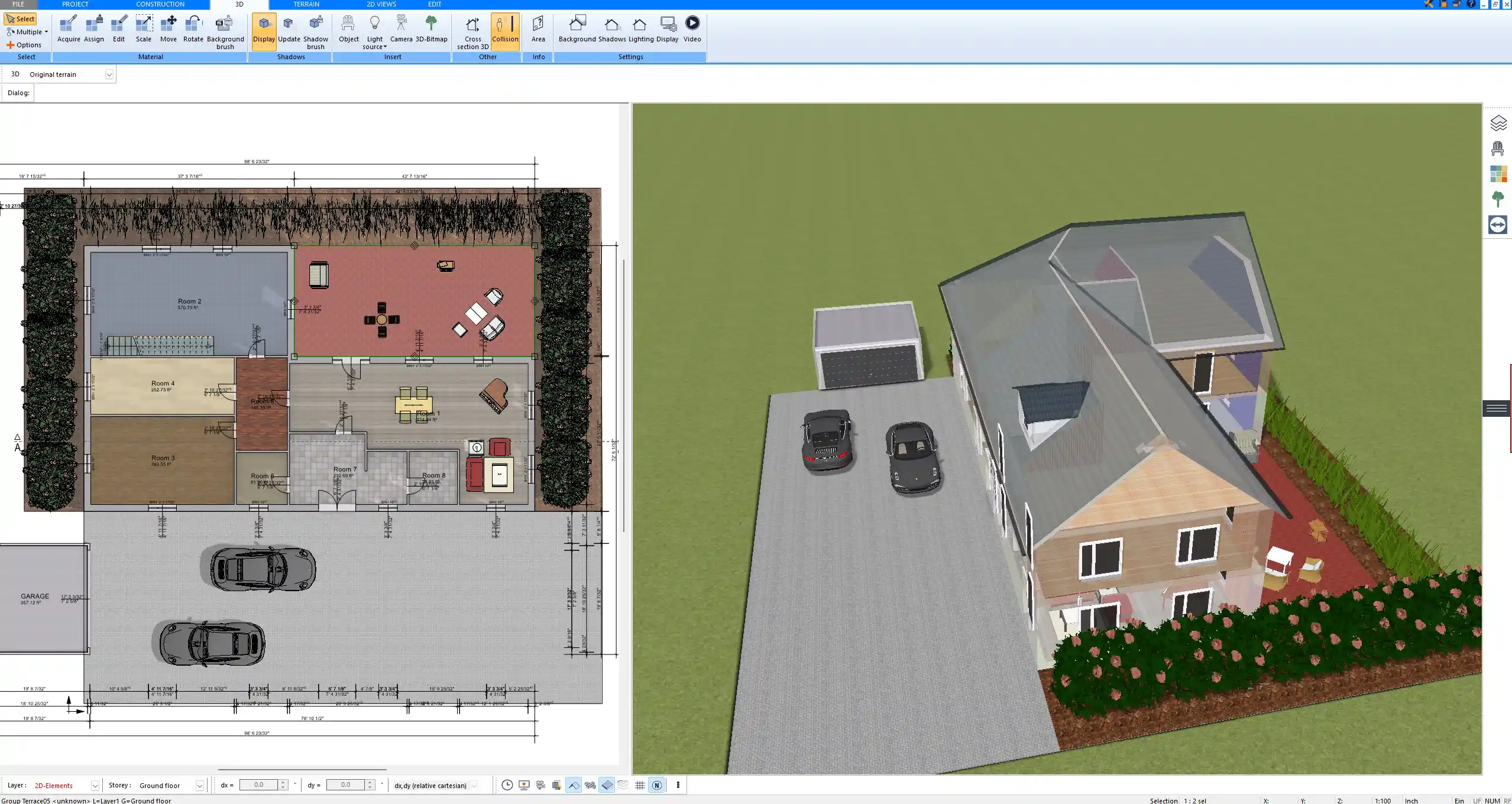
Floor plan created with Plan7Architect showing precise wall dimensions, room layouts and construction details

What Contractors Actually Need from Planning Software

As a contractor, you do not need unnecessary complexity. You need speed, precision and clarity. The software must support your workflow, not slow it down.

1. Fast Floor Plan Creation

The core of any construction project is the floor plan. In daily practice, you often start from a sketch, a client idea or an existing structure that needs modification.

With Plan7Architect, you can:

  • Draw walls with exact dimensions

  • Define wall thicknesses precisely

  • Control interior or exterior dimensions

  • Insert doors and windows with exact positioning

  • Automatically detect and label rooms

  • Switch between metric and imperial units at any time

You can work with common wall thicknesses used in residential construction, for example 11.5 cm or 24 cm masonry, or typical framed wall constructions such as 4 inch or 6 inch walls. The software allows you to adjust these values freely.

Tip:
If you frequently build similar structures, such as garages or extensions, you can save templates and reuse them for future projects, reducing planning time significantly.

2. Construction-Ready Drawings

Contractors need more than a simple layout. You need drawings that communicate clearly on site.

Plan7Architect allows you to generate:

  • Dimensioned floor plans

  • Exterior elevations

  • Cross-sections

  • Roof plans

  • Detailed construction layouts

Sections are generated directly from your 3D model. You define where the cut should be placed and the software creates the sectional view automatically. This is particularly useful when explaining ceiling heights, roof slopes or structural transitions.

You can create ceiling heights such as 8 ft, 9 ft or 10 ft, or 2.40 m, 2.70 m or 3.00 m depending on regional standards. The dimensions are fully adjustable and displayed according to the unit system you choose.

3. 3D Visualization for Client Approval

One of the most effective ways to reduce misunderstandings and change orders is to show the project in 3D before construction begins.

Plan7Architect includes:

  • Real-time 3D visualization

  • Interior and exterior views

  • Walkthrough mode

  • Material and texture adjustments

You can walk your client through the building virtually. This helps clarify room proportions, window positions, roof forms and façade design. In my experience, once clients see their project in 3D, decision-making becomes faster and more confident.

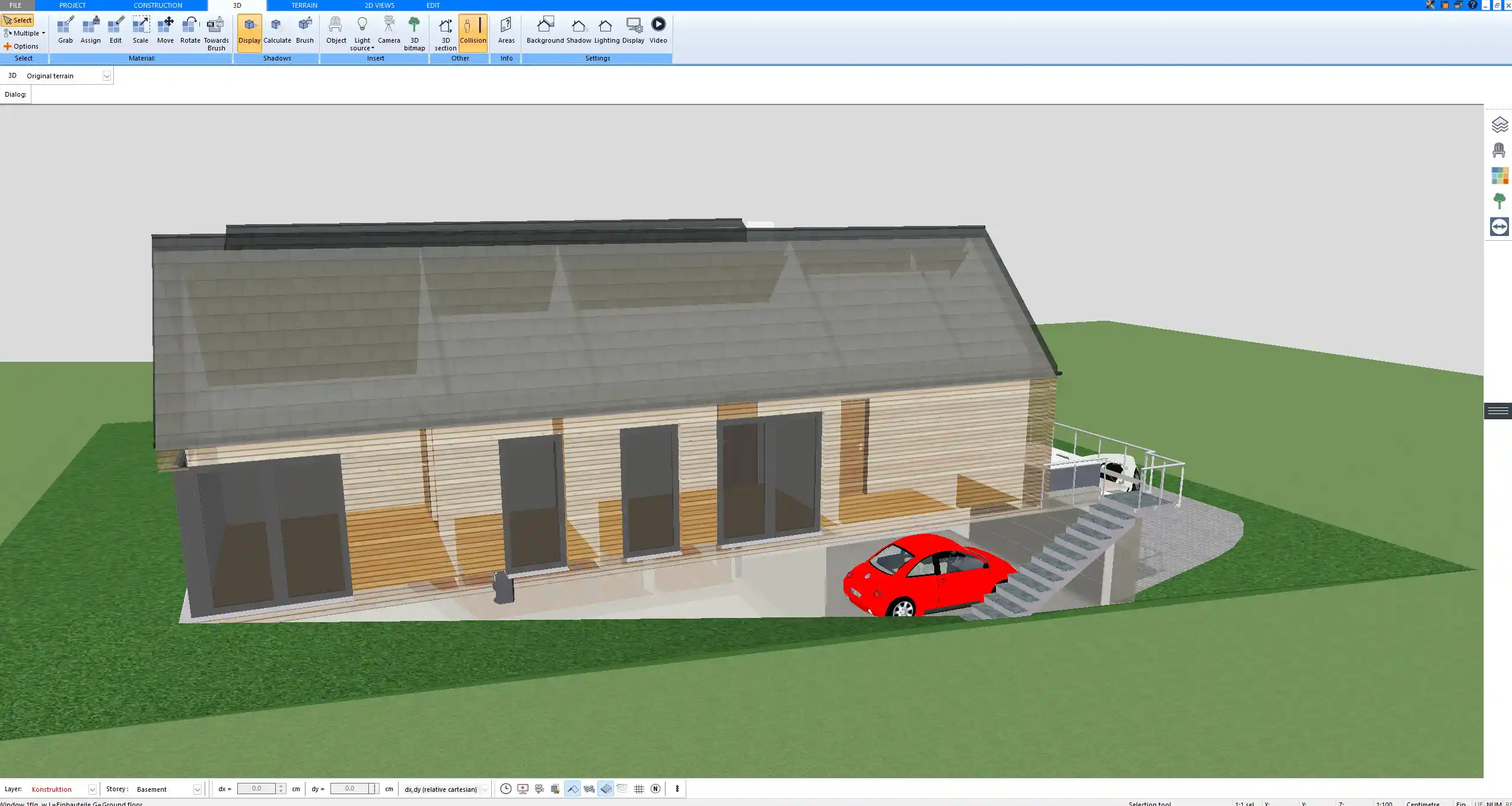
3D exterior visualization generated in Plan7Architect for client presentation and design review

4. Modifications and Variants

In real construction projects, changes are normal. Walls move. Openings change. Ceiling heights are adjusted. Layouts evolve.

With Plan7Architect, you can:

  • Move walls without redrawing the entire plan

  • Adjust room dimensions interactively

  • Modify roof shapes

  • Change window and door sizes

  • Create layout variants for comparison

You can test different design options quickly and present them side by side. This is especially useful in remodeling and extensions, where existing constraints require flexible solutions.

Why Contractors Choose Plan7Architect Over Other Software

One-Time Purchase Instead of Subscription

Many professional CAD systems require monthly or yearly subscriptions. For contractors who plan projects intermittently, this creates unnecessary pressure.

Plan7Architect is a one-time purchase. Once licensed, you can use it without recurring fees. This makes it especially attractive for:

  • Small construction companies

  • Independent contractors

  • Design-build professionals

  • Builders transitioning from paper planning

Built on Professional Architecture Technology

Plan7Architect is not a basic home design toy. It is based on established professional architectural CAD technology originally developed for serious construction planning.

This foundation allows you to:

  • Create detailed construction drawings

  • Work with precise measurements

  • Define structural components accurately

  • Generate professional print layouts

At the same time, the interface remains accessible enough for contractors without formal CAD training.

Beginner-Friendly but Powerful

There is a learning curve, as with any serious planning software. However, you do not need to be an architect to use it effectively.

The software provides:

  • Video tutorials

  • Structured toolbars

  • Interactive dimension tools

  • Logical workflow from floor plan to 3D

In practice, most contractors become productive after a few focused hours of training.

Typical Use Cases for Contractors

Plan7Architect covers a wide range of practical scenarios.

Remodeling Projects

In remodeling, precision and clarity are essential.

Typical applications include:

  • Kitchen redesigns

  • Bathroom renovations

  • Wall removals and structural modifications

  • Interior layout optimization

You can draw existing structures and plan modifications directly within the same model. This helps visualize load-bearing walls, ceiling transitions and new room configurations.

Complete construction drawing set prepared with Plan7Architect including floor plan, elevations and dimensions

New Residential Construction

For new builds, you can create complete project plans including:

  • Single-family homes

  • Duplex houses

  • Garages

  • Barn-style houses

  • Small apartment buildings

You define wall constructions, roof types, staircases and ceiling heights. Roof planning tools allow you to create gable roofs, hip roofs or more complex structures with defined slopes.

Additions and Extensions

Extensions often require careful integration into the existing building.

You can:

  • Model the existing structure

  • Add a second story

  • Plan basement finishing

  • Design porch or terrace extensions

  • Modify roof geometry

Because everything is model-based, changes are reflected consistently across plans and views.

Small Commercial Projects

Plan7Architect is also suitable for smaller commercial projects such as:

  • Workshops

  • Offices

  • Storage buildings

  • Retail units

For larger multi-story commercial buildings with advanced BIM collaboration needs, specialized enterprise solutions may be more appropriate.

Does It Replace an Architect

This depends on your local regulations.

Plan7Architect enables you to create professional and technically detailed plans. However, in many regions, permit submission requires stamping or approval by a licensed architect or engineer.

The software helps you prepare:

  • Clean floor plans

  • Dimensioned layouts

  • Sections and elevations

  • Construction-ready documentation

You can then submit these plans to a licensed professional for review and stamping if required.

Technical Capabilities Contractors Care About

Below is a structured overview of relevant features.

Feature | Practical Benefit for Contractors
Precise dimension tools | Exact control over room sizes and wall lengths
Layer control | Organize drawings clearly for printing
Roof construction tools | Create realistic and buildable roof designs
Stair planning | Define rise, run and width accurately
Terrain modeling | Plan on sloped sites
Electrical symbols | Basic layout planning for outlets and lighting
Plumbing layout tools | Plan pipe routing conceptually
Window and door customization | Adjust sizes and positions freely
Automatic sections | Generate cross-sections from the model
Print layouts | Prepare scaled plans for documentation

The interactive dimension tools are especially useful. You can activate them to adjust walls directly by entering exact values.

Note:
You can switch between metric and US customary units at any time in the software settings. This makes the program suitable for contractors worldwide without changing your workflow.

Metric and Imperial Units

Plan7Architect supports both metric and imperial measurement systems. You can choose the unit system that matches your local standards.

Whether you work in centimeters and meters or inches and feet, all dimensions are displayed and calculated accordingly. This flexibility allows contractors in Europe, North America, Australia and other regions to use the software comfortably.

Who Is This Software Ideal For

Plan7Architect is particularly well suited for:

  • General contractors

  • Design-build contractors

  • Remodeling specialists

  • Small construction companies

  • Independent builders

  • Contractors transitioning from hand-drawn plans to digital planning

If you currently sketch layouts on grid paper and want a digital solution without committing to expensive subscription software, this tool provides a structured and professional upgrade.

Who It Is Not For

Plan7Architect may not be the ideal solution for:

  • Large architectural firms working with complex BIM collaboration workflows

  • High-rise commercial tower projects

  • Multi-user cloud-based enterprise environments requiring real-time team coordination

In those cases, highly specialized BIM platforms may be more appropriate.

Final Verdict – Is Plan7Architect Good Software for Contractors

For contractors who need reliable construction planning software without enterprise complexity or recurring subscription costs, Plan7Architect offers a strong balance of functionality, precision and affordability.

You can create professional floor plans, sections, elevations and 3D visualizations. You maintain full control over dimensions, wall constructions and structural elements. You can present projects clearly to clients and prepare documentation for permit processes.

For small to medium residential and light commercial projects, it provides the practical tools contractors need to plan efficiently and professionally.

Plan your project with Plan7Architect

Plan7Architect Pro

Plan7Architect Pro 5 for $109.99

You don’t need any prior experience because the software has been specifically designed for beginners. The planning process is carried out in 5 simple steps:

1. Draw Walls

Create your 2D floor plan by accurately drawing and adjusting rooms and walls for your home design.

2. Windows & Doors

Optimize your space layout with perfectly fitting door and window elements.

3. Floors & Roof

Visualize different levels and roof types for your home design.

4. Textures & 3D Objects

Choose materials and textures to customize floors, walls, and 3D objects individually for a realistic representation of your design.

5. Plan for the Building Permit

Sections and views for the building application can be created with Plan7Architect (1)
Create professional construction drawings with elevations, sections, and complete plan compilations.

6. Export the Floor Plan as a 3D Model for Twinmotion

Visualize your project with cutting-edge 3D technology and create high-quality image renderings and videos using Twinmotion by Epic Games.


  • – Compliant with international construction standards
  • – Usable on 3 PCs simultaneously
  • – Option for consultation with an architect
  • – Comprehensive user manual
  • – Regular updates
  • – Video tutorials
  • – Millions of 3D objects available

Why Thousands of Builders Prefer Plan7Architect

Why choose Plan7Architect over other home design tools?

14-Day Money-Back Guarantee
No questions asked. Just email us within 14 days if you’re not satisfied.
One-time payment – no subscription
Own the software forever. No hidden costs. No monthly fees. Updates are optional.
Based on $2,500 professional architecture software
Plan7Architect is an optimized version — used by professionals and private users alike.
Supports international building standards
Adaptable to US, UK, Canadian, Australian, and European requirements.
Works offline – use on up to 3 devices
No internet required. Install on up to 3 computers – ideal for home and office use.
Metric & imperial units
Switch freely between feet/inches or meters/centimeters — perfect for global use.
++
All key export/import formats included
DWG, DXF, OBJ, 3DS, STL, PDF, image export/import, and SketchUp import — for smooth collaboration.
ii
Create real building permit documents
Generate floor plans, elevations, cross-sections, and full construction drawings.
Supports wood framing for walls and roofs
Design wall and roof structures, gables, dormers, and freely constructed wood frameworks.
Easy learning curve with full support
Includes video tutorials, ticket system, detailed PDF manual, sample projects, and access to our customer forum.
Excellent verified reviews
Top ratings on Trusted Shops and Amazon.
Ongoing development – 3–4 updates per year
Always improving, with a modern 3D engine and regular feature upgrades.

Watch how a complete house is planned from start to finish – in under 25 minutes

Detailed House Planning (25 Min)

Small Home Planning Demo (12 Min)

The 3 Plan7Architects

Sale!
Plan7Architect Pro
Original price was: $259.99.Current price is: $109.99.

Verified Customer Reviews

Verified Customer Reviews

Trusted Shops:

Home » Architecture software » Software for Contractors – Plan7Architect
Youtube
Select your currency
