

Best Software for Architecture Students – Plan7Architect

If you are studying architecture and looking for reliable software that allows you to create professional floor plans, sections, elevations, and 3D models without paying expensive subscription fees, Plan7Architect is a very strong option.

Plan7Architect combines technical 2D construction drawings with real-time 3D modeling in one workflow. It supports both European and American measurement systems, so you can work in metric or imperial units depending on your university requirements. It is available as a one-time purchase, which makes it financially realistic for students. At the same time, it includes tools that are normally expected from professional architectural planning software.

For architecture students, this means:

  • You can create scaled floor plans suitable for studio submissions

  • You can generate sections and elevations directly from your model

  • You can develop full 3D models for design exploration

  • You can export drawings as PDF, DWG, or DXF

  • You are not locked into a subscription during or after your studies

If you need software that supports both creative design development and technical drawing output, Plan7Architect covers both areas in a structured and accessible way.

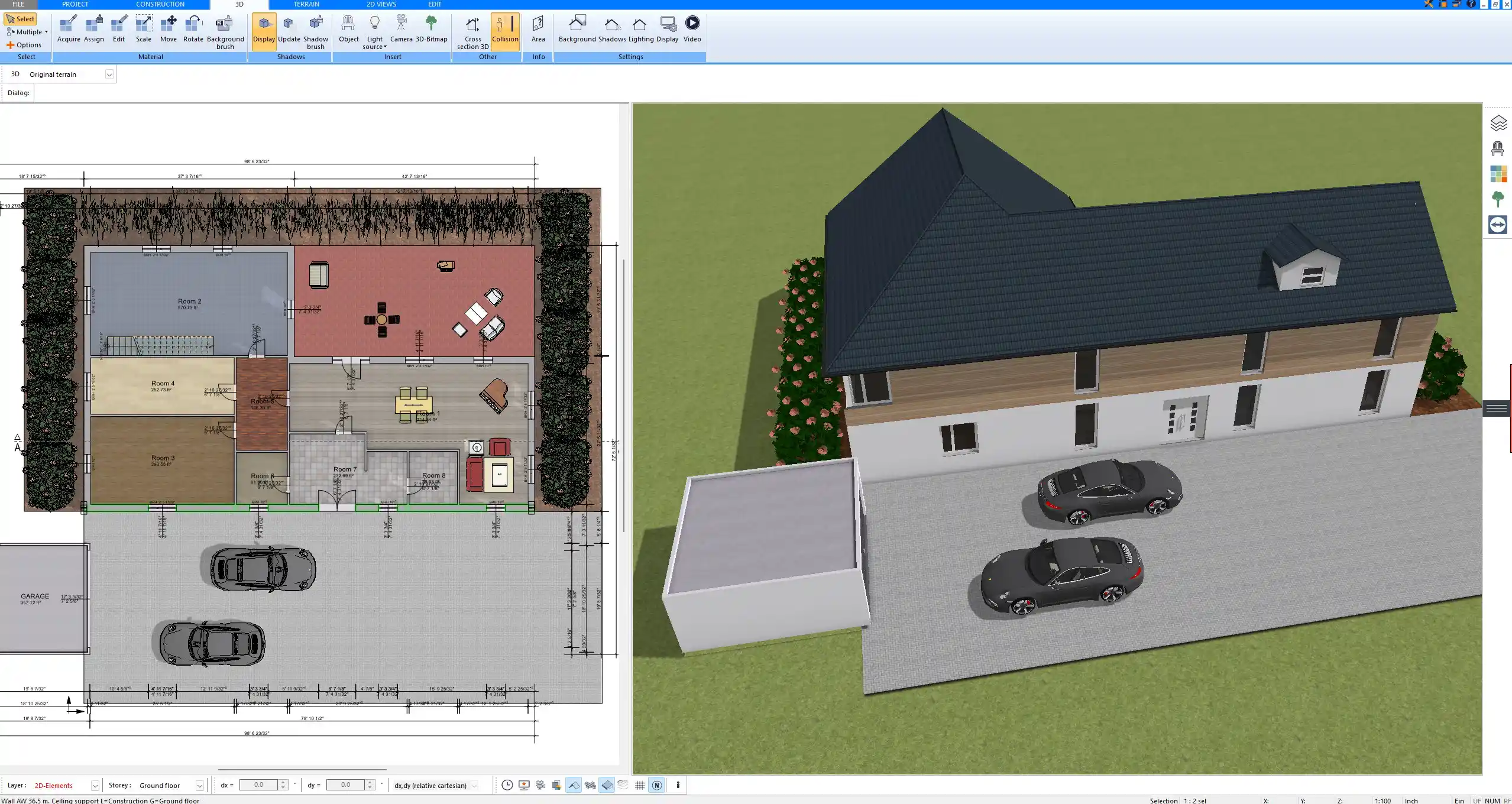
Floor plan created in Plan7Architect – scaled 2D construction drawing with precise dimensions

What Architecture Students Actually Need from Design Software

Architecture students often face a gap between academic expectations and the tools they can realistically afford or learn within one semester. From experience, the most important requirements are not flashy renderings, but reliable drafting tools and clear workflows.

2D Construction Drawings for Studio Projects

At university level, you are required to submit:

  • Scaled floor plans

  • Building sections

  • Exterior elevations

  • Detailed dimensioning

  • Print-ready layouts

In Plan7Architect, you draw walls with defined thickness, assign materials, define openings, and place doors and windows with exact dimensions. You can activate dimension tools for wall segments and full rooms, which allows you to work with precise internal or external measurements.

If your project requires wall thicknesses of 300 millimeters or 12 inches, you can define this directly. If ceiling heights must be 2600 millimeters or 9 feet, you simply enter the value. The software allows you to switch between metric and imperial units at any time, depending on your regional standard.

You can generate scaled layouts suitable for printing. Typical studio scales such as 1 to 100, 1 to 50, or 1 to 200 can be configured in the layout view. This makes it possible to submit drawings that meet academic presentation standards.

3D Modeling for Design Development

Architecture studies require spatial understanding. A 2D plan alone is not enough.

Plan7Architect allows you to:

  • Switch instantly between 2D and 3D

  • Modify roof shapes interactively

  • Insert stairs with defined geometry

  • Adjust floor heights and building levels

  • Visualize structural and interior elements

When you change a wall in 2D, you immediately see the effect in 3D. This is extremely helpful during design phases when you are testing proportions, window placements, or room heights.

You can model multi-story buildings, basement levels, attic spaces, and roof constructions. For example, if your project includes a barn-style roof with higher interior volumes, you can define roof pitch, ridge height, and wall elevations directly.

Presentation-Ready Visualizations

While technical drawings are essential, visual presentation is equally important.

With Plan7Architect, you can create:

  • Perspective views

  • Interior visualizations

  • Exterior views

  • Camera walkthrough perspectives

You can export these views as image files for inclusion in presentation boards or digital portfolios. This is particularly useful when preparing final semester projects or portfolio applications.

Compatibility with University Workflows

Universities often require file exchange formats.

Plan7Architect supports:

  • DWG import and export

  • DXF import and export

  • 3DS and OBJ export for 3D use

  • PDF export for drawing submissions

This allows you to collaborate with classmates or integrate external CAD files provided by instructors. If you receive a DWG file from a professor, you can import it, use it as a reference, and continue developing your project.

Why Many Students Struggle with Traditional Architecture Software

Many architecture students start with well-known industry software and quickly feel overwhelmed.

Expensive Subscriptions

Professional architectural software is often subscription-based. Monthly or yearly fees can become a financial burden for students.

Common challenges include:

  • Student licenses that expire after graduation

  • Projects locked behind subscription payments

  • Additional modules requiring extra payment

If you stop paying, access to your own files may become restricted. For a student who is still building a portfolio, this can be problematic.

3D building model designed in Plan7Architect – real-time visualization directly generated from the floor plan

Overly Complex Interfaces

Many enterprise-level tools are designed for large architectural firms. They include advanced collaboration systems, BIM databases, and complex configuration menus.

For students, this often means:

  • Long learning curves

  • Difficulty finding basic tools

  • Spending more time learning software than designing

In academic environments with tight deadlines, software complexity can slow you down significantly.

Hardware Demands

Some professional programs require powerful workstations with high-end graphics cards and large memory capacity.

Students frequently use standard laptops. If the software is too demanding, it may run slowly or become unstable during rendering or modeling tasks.

How Plan7Architect Supports Architecture Students

Plan7Architect is structured in a way that balances professional functionality with clarity.

Professional Construction Planning Tools

The software includes:

  • Layer-based planning

  • Adjustable wall structures

  • Roof editing tools

  • Section generation

  • Interactive dimension tools

You can define wall compositions, adjust structural thickness, and configure multi-layer constructions. Sections are generated directly from your model, so you do not need to redraw them manually.

A typical workflow might look like this:

Step Action in Plan7Architect
Define floor plan Draw walls with precise dimensions
Insert openings Place doors and windows with set sizes
Set floor heights Define story levels and ceiling heights
Create roof Adjust pitch and ridge parameters
Generate section Automatically cut through the model

This structured process reflects how architectural design is taught academically.

2D and 3D in One Workflow

Instead of separating drafting and modeling into different programs, Plan7Architect integrates both.

You draw in 2D. You check proportions in 3D. You refine again in 2D. The workflow remains connected.

For students, this is particularly useful when:

  • Testing multiple layout variants

  • Comparing spatial proportions

  • Adjusting facade compositions

  • Evaluating natural light through window placement

This iterative process supports design thinking without unnecessary technical barriers.

Supports Metric and Imperial Units

Architecture students around the world use different measurement systems. In Europe, metric units are standard. In the United States and other regions, imperial units are common.

Plan7Architect allows you to switch between these systems in the settings. This means you can work in millimeters or inches, meters or feet, depending on your university’s requirements. You do not need to convert values manually.

One-Time Purchase – No Student License Expiry

One of the most practical advantages for students is the licensing model.

With Plan7Architect:

  • You purchase once

  • You keep the software

  • You continue using it after graduation

There is no subscription pressure during thesis phases or when preparing your portfolio. You maintain access to your own projects long-term.

Can You Use Plan7Architect for University Projects?

Yes, it can be used for a wide range of academic assignments.

Studio Design Projects

You can design residential buildings, small commercial structures, renovation projects, or conceptual houses. The tools are suitable for typical studio briefs such as single-family homes, townhouses, or small public buildings.

Technical Construction Drawings

Plan7Architect allows detailed dimensioning and section generation. You can produce construction drawings that show wall thicknesses, floor structures, roof geometry, and openings.

Portfolio Preparation

You can export both technical drawings and 3D views. This makes it possible to prepare clean portfolio layouts combining:

  • Floor plans

  • Sections

  • Elevations

  • Rendered perspectives

Concept Studies and Variants

During design phases, you often test multiple layout options. Because the software allows quick duplication and modification of plans, you can explore variants without starting from scratch.

Below is a summary of core capabilities relevant for university work:

Requirement Plan7Architect Capability
Scaled floor plans Yes
Sections and elevations Yes
3D visualization Yes
PDF export Yes
DWG and DXF compatibility Yes
Metric and imperial units Yes

Plan7Architect vs Other Software for Architecture Students

Choosing software as a student often involves balancing cost, complexity, and output quality.

Compared to Subscription-Based CAD Software

Plan7Architect differs in several areas:

  • No recurring monthly payment

  • Full ownership after purchase

  • No risk of losing access to files

For students managing tuition fees and living costs, predictable one-time pricing can be a significant advantage.

Compared to Pure 3D Modeling Tools

Some software focuses only on visual modeling without proper construction documentation tools.

Plan7Architect includes:

  • Detailed dimensioning

  • Wall thickness control

  • Section generation

  • Scaled layout printing

This makes it more suitable for technical architectural education rather than purely conceptual 3D modeling.

Is Plan7Architect Beginner-Friendly for First-Year Students?

Architecture students in their first semester often have limited CAD experience.

Plan7Architect is not a simple game-like tool, but it is structured logically. Most students can become productive after working through tutorials and practicing basic floor plan drawing.

Important aspects for beginners:

  • Clear tool categories

  • Direct wall drawing methods

  • Interactive dimension activation

  • Immediate 3D feedback

If you are willing to invest time in learning the fundamentals, you can achieve professional-looking results even without previous CAD training.

System Requirements for Students

Plan7Architect runs on standard Windows computers.

You do not need a high-end workstation. A typical student laptop with sufficient memory and a modern processor is generally adequate for handling academic-scale projects such as residential buildings or small design studies.

This makes it accessible for most students without requiring additional hardware investment.

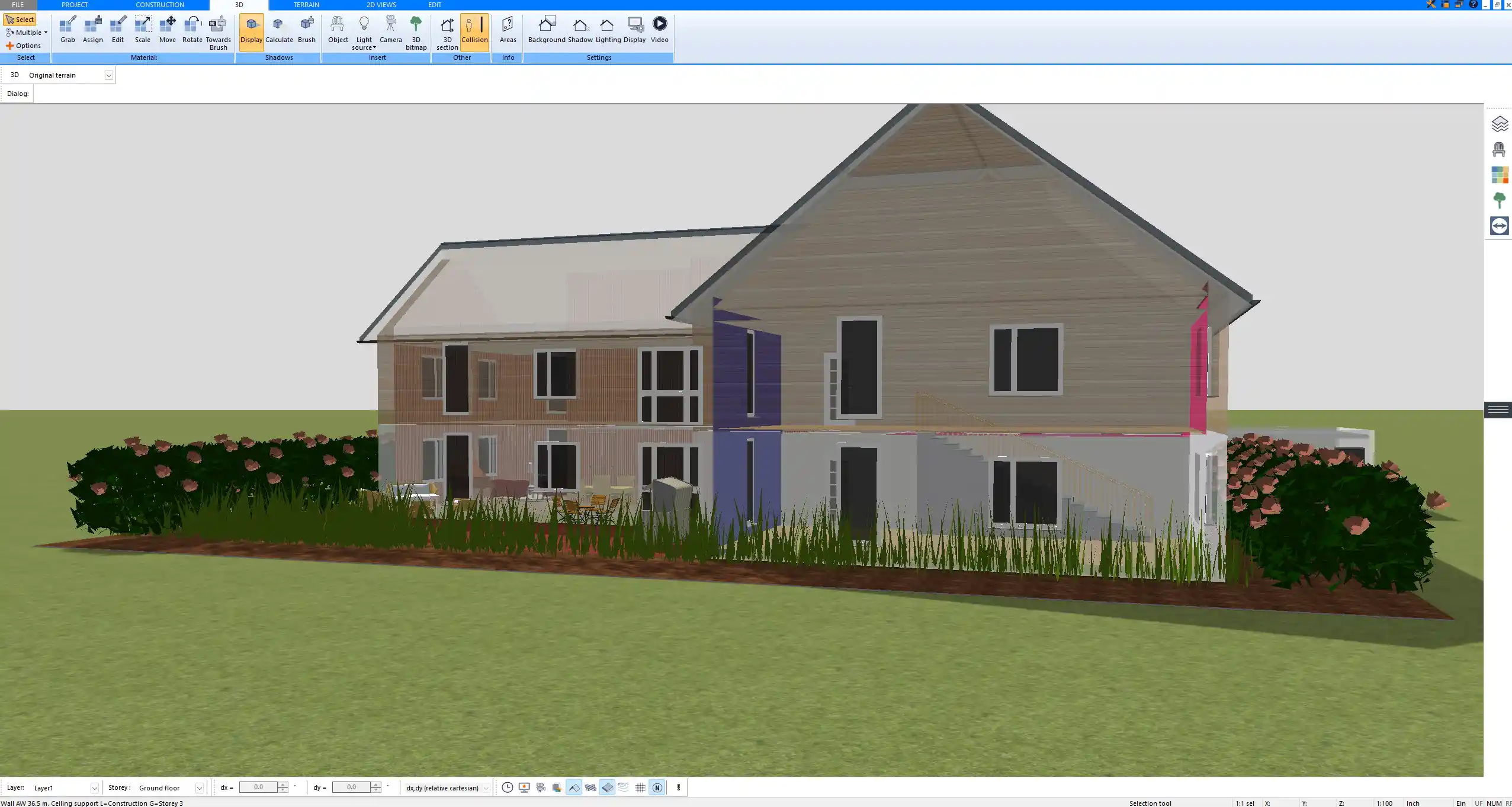
Complete multi-story building planned in Plan7Architect – combined 2D drafting and 3D modeling workflow for architecture students

Who Should Use Plan7Architect as a Student?

Plan7Architect is particularly suitable for:

  • Architecture students working on residential design

  • Interior design students needing technical floor plans

  • Construction management students preparing building layouts

  • Students creating permit-style documentation

  • Self-taught designers building their first portfolio

If your academic focus is on small to medium-scale buildings and you require both technical drawings and 3D visualization, the software aligns well with your needs.

Who Might Need More Advanced Enterprise Software?

There are situations where more complex systems may be required.

These include:

  • Large-scale collaborative BIM projects

  • Multi-disciplinary office workflows

  • Highly complex commercial building coordination

In purely academic contexts, these scenarios are less common. For typical university studio projects, Plan7Architect covers the essential tools.

Plan your project with Plan7Architect

Plan7Architect Pro

Plan7Architect Pro 5 for $109.99

You don’t need any prior experience because the software has been specifically designed for beginners. The planning process is carried out in 5 simple steps:

1. Draw Walls

Create your 2D floor plan by accurately drawing and adjusting rooms and walls for your home design.

2. Windows & Doors

Optimize your space layout with perfectly fitting door and window elements.

3. Floors & Roof

Visualize different levels and roof types for your home design.

4. Textures & 3D Objects

Choose materials and textures to customize floors, walls, and 3D objects individually for a realistic representation of your design.

5. Plan for the Building Permit

Sections and views for the building application can be created with Plan7Architect (1)
Create professional construction drawings with elevations, sections, and complete plan compilations.

6. Export the Floor Plan as a 3D Model for Twinmotion

Visualize your project with cutting-edge 3D technology and create high-quality image renderings and videos using Twinmotion by Epic Games.


  • – Compliant with international construction standards
  • – Usable on 3 PCs simultaneously
  • – Option for consultation with an architect
  • – Comprehensive user manual
  • – Regular updates
  • – Video tutorials
  • – Millions of 3D objects available

Why Thousands of Builders Prefer Plan7Architect

Why choose Plan7Architect over other home design tools?

14-Day Money-Back Guarantee
No questions asked. Just email us within 14 days if you’re not satisfied.
One-time payment – no subscription
Own the software forever. No hidden costs. No monthly fees. Updates are optional.
Based on $2,500 professional architecture software
Plan7Architect is an optimized version — used by professionals and private users alike.
Supports international building standards
Adaptable to US, UK, Canadian, Australian, and European requirements.
Works offline – use on up to 3 devices
No internet required. Install on up to 3 computers – ideal for home and office use.
Metric & imperial units
Switch freely between feet/inches or meters/centimeters — perfect for global use.
++
All key export/import formats included
DWG, DXF, OBJ, 3DS, STL, PDF, image export/import, and SketchUp import — for smooth collaboration.
ii
Create real building permit documents
Generate floor plans, elevations, cross-sections, and full construction drawings.
Supports wood framing for walls and roofs
Design wall and roof structures, gables, dormers, and freely constructed wood frameworks.
Easy learning curve with full support
Includes video tutorials, ticket system, detailed PDF manual, sample projects, and access to our customer forum.
Excellent verified reviews
Top ratings on Trusted Shops and Amazon.
Ongoing development – 3–4 updates per year
Always improving, with a modern 3D engine and regular feature upgrades.

Watch how a complete house is planned from start to finish – in under 25 minutes

Detailed House Planning (25 Min)

Small Home Planning Demo (12 Min)

The 3 Plan7Architects

Sale!
Plan7Architect Pro
Original price was: $259.99.Current price is: $109.99.

Verified Customer Reviews

Verified Customer Reviews

Trusted Shops:

Home » Architecture software » Best Software for Architecture Students – Plan7Architect
Youtube
Select your currency
