

The best FreeCAD alternative for house plans is Plan7Architect: instead of building walls from sketches and setting up drawing sheets in separate workbenches, you plan with real walls, doors, windows, floors and roofs, and the program creates floor plans, sections, elevations and permit drawings from the same model. It is a one-time purchase for $169.99 and is designed for beginners without CAD experience. If you want to stay free, Sweet Home 3D is the easiest option for room layouts and Blender the strongest for 3D modeling and rendering.
FreeCAD is a powerful open source CAD program, and its BIM workbench can do much more than most people expect from free software. Many users start looking for an alternative when they actually want to plan a house: they spend more time learning workbenches, sketches and recomputes than designing rooms, and roofs, dimensions and plan sheets take a lot of manual work. Below you will find the 7 best FreeCAD alternatives, free and paid, compared side by side.
FreeCAD Alternatives Compared
Swipe sideways to see all programs →
| Feature | Plan7Architect Pro 5TOP | FreeCAD | Sweet Home 3D | Blender | SketchUp | AutoCAD LT |
|---|---|---|---|---|---|---|
| Price | $169.99 one-timeLifetime license, no subscription | FreeOpen source | FreeOpen source | FreeOpen source | Free web versionPersonal use only; Pro $399/year | $540/yearor $70/month |
| One-time purchase instead of a subscription | ✓Lifetime license | ✓Free | ✓Free | ✓Free | ✕ | ✕ |
| Made for house and building planning | ✓Focused on houses | ✓BIM workbench | ✓Interior layouts | ✕General 3D modeling | ✕General 3D modeling | ✕General 2D drafting |
| Easy to learn without CAD experience | ✓ | ✕Steep learning curve | ✓ | ✕Steep learning curve | ✓Easy start, harder for exact plans | ✕CAD knowledge needed |
| Plans with real walls instead of drawn lines | ✓Nothing is drawn line by line | ✓BIM workbench, often from sketches | ✓ | ✕Meshes modeled by hand | ✕Lines and faces drawn by hand | ✕Lines drawn by hand |
| Windows and doors cut their openings automatically | ✓ | ✓ | ✓ | ✕Modeled by hand | ✕Openings cut manually | ✕Drawn as lines |
| Building logic: walls, floors and roofs know how they connect | ✓ | ✓Partly manual | ✕Walls only | ✕ | ✕Does not know what a wall is | ✕ |
| Changes update plans, sections, elevations and 3D automatically | ✓2D and 3D always in sync | ✓After recompute | ✕No sections | ✕ | ✕Views maintained separately | ✕No 3D model |
| Custom building elements saved to the catalog | ✓Walls, roofs, windows, doors, beams | ✓Via add-ons | ✓Furniture import | ✓Asset library | ✓Components | ✓Blocks |
| 2D floor plan | ✓ | ✓ | ✓ | ✕Via add-ons | ✓Drawn manually | ✓Drawn manually |
| 3D view and walkthrough | ✓ | ✓Basic | ✓ | ✓ | ✓ | ✕2D only |
| Automatic dimensioning | ✓ | ✕Manual dimensions | ✕Manual dimensions | ✕ | ✕Manual dimensions | ✕Manual dimensions |
| Furniture and object library | ✓Extensive, plus 3D Warehouse import | ✕Limited | ✓ | ✕Import or model yourself | ✓3D Warehouse | ✕2D blocks |
| Building permit drawings | ✓Simplified creation | ✕Manual setup in TechDraw | ✕ | ✕ | ✕Manual work in LayOut (Pro) | ✓Drawn by hand |
| Sections and elevations from the model | ✓ | ✓ | ✕ | ✕ | ✓Manual section setup | ✕Drawn by hand |
| Plan assembly with title blocks | ✓ | ✓TechDraw | ✕ | ✕ | ✓LayOut (Pro) | ✓ |
| Collaboration with architects (DWG/DXF) | ✓Import and export | ✓DXF, DWG with converter | ✕Via plugins | ✕Via add-ons | ✓Pro only | ✓ |
| Layer management | ✓Detailed | ✓ | ✓Levels | ✓Collections | ✓Tags | ✓ |
| Different plan variants | ✓Flexible | ✕ | ✕ | ✕ | ✕ | ✕ |
| Terrain modeling | ✓Including contour lines | ✕Limited | ✕Basic ground only | ✓Modeled by hand | ✓Manual sandbox tools | ✕ |
| Automatic roof construction | ✓All common roof types, dormers | ✕Basic roof tool | ✕ | ✕Modeled by hand | ✕Modeled by hand | ✕ |
| Timber construction tools | ✓Special tools | ✕Via add-ons | ✕ | ✕ | ✕Via plugins | ✕ |
| Custom beam structures | ✓ | ✓ | ✕ | ✕Modeled by hand | ✕Via plugins | ✕Drawn as lines |
| Foundation planning | ✓ | ✕Modeled by hand | ✕ | ✕ | ✕Modeled by hand | ✕Drawn by hand |
| Electrical, heating and plumbing planning | ✓Complete | ✕Limited | ✕Lights only | ✕ | ✕Via plugins | ✕Symbols drawn by hand |
| Living and usable area calculation | ✓ | ✓ | ✓Room area | ✕ | ✕Manual | ✕Measure manually |
| Architecture tools built in, no plugins needed | ✓ | ✓BIM workbench | ✕Limited | ✕ | ✕ | ✕ |
| Unlimited floors and buildings | ✓ | ✓ | ✓Levels | ✓ | ✓ | ✓ |
| Metric and imperial units | ✓ | ✓ | ✓ | ✓ | ✓ | ✓ |
Prices as of October 2026, taken from the vendors’ websites and software directories. Prices may vary by region.
Why People Look for a FreeCAD Alternative
FreeCAD is a general parametric CAD program for engineering, product design and mechanical parts. Architecture is one of many areas it covers through the BIM workbench, and the program is built for technical users who like to control every step. These are the most common reasons users switch:
- Steep learning curve: you have to understand workbenches, sketches, constraints and the model tree before a house plan comes together, and the interface changes with every workbench.
- Manual drawing sheets: sections, elevations, dimensions and title blocks are set up by hand in the TechDraw workbench, view by view.
- Few ready-made house tools: roofs are basic, there is no automatic dimensioning, and timber framing, foundations and building services take extra work or add-ons.
- Limited furniture library: furnishing a house means finding and importing models yourself.
Drawing Lines vs. Planning Walls: The Key Difference
The most important difference is how you work. In FreeCAD, even with the BIM workbench, a wall usually starts as a line or a sketch that you turn into a wall object, and many results need a recompute or a manual setup before they are correct. Plan7Architect works with real building elements from the start. A wall is a wall with a thickness, layers and a height, a window creates its own opening, and the program knows how walls, floors and roofs connect. This is what saves you hours on every house plan:
Swipe sideways to see the full comparison →
| Task | FreeCAD | Plan7Architect |
|---|---|---|
| Draw a wall | Draw a line or sketch, convert it to a wall, then set thickness and height | Draw the wall once; thickness, layers and height are part of the wall |
| Insert a window or door | Choose a preset or sketch the frame, then add it to the wall | Place the window, the opening is created automatically |
| Change a room size | Edit the base sketch or line, then recompute and check the result | Move the wall, the model, dimensions and areas are updated |
| Build the roof | Create a roof from a wire and set the slopes edge by edge | Choose the roof type, the roof is constructed automatically |
| Sections and elevations | Set up section planes and TechDraw pages manually | Generated from the model and always up to date |
| Dimensions | Add each dimension by hand on the drawing sheet | Created automatically |
1. Plan7Architect: Best Overall FreeCAD Alternative for House Plans
Price: $169.99 one-time purchase, lifetime license, no subscription
Platform: Windows desktop software
Best for: homeowners, self-builders, contractors and designers who want to plan a complete house, from the first floor plan to permit drawings
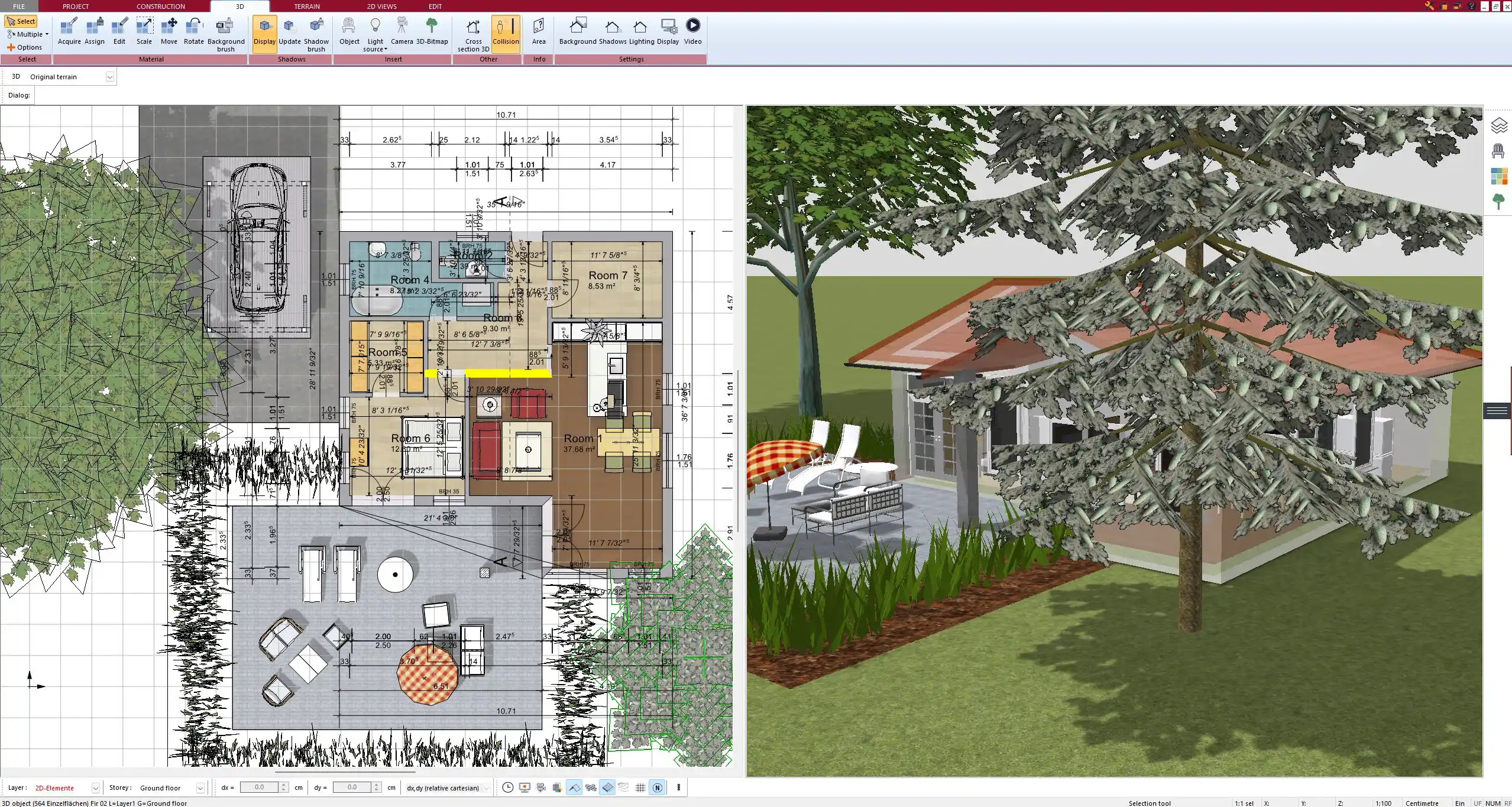
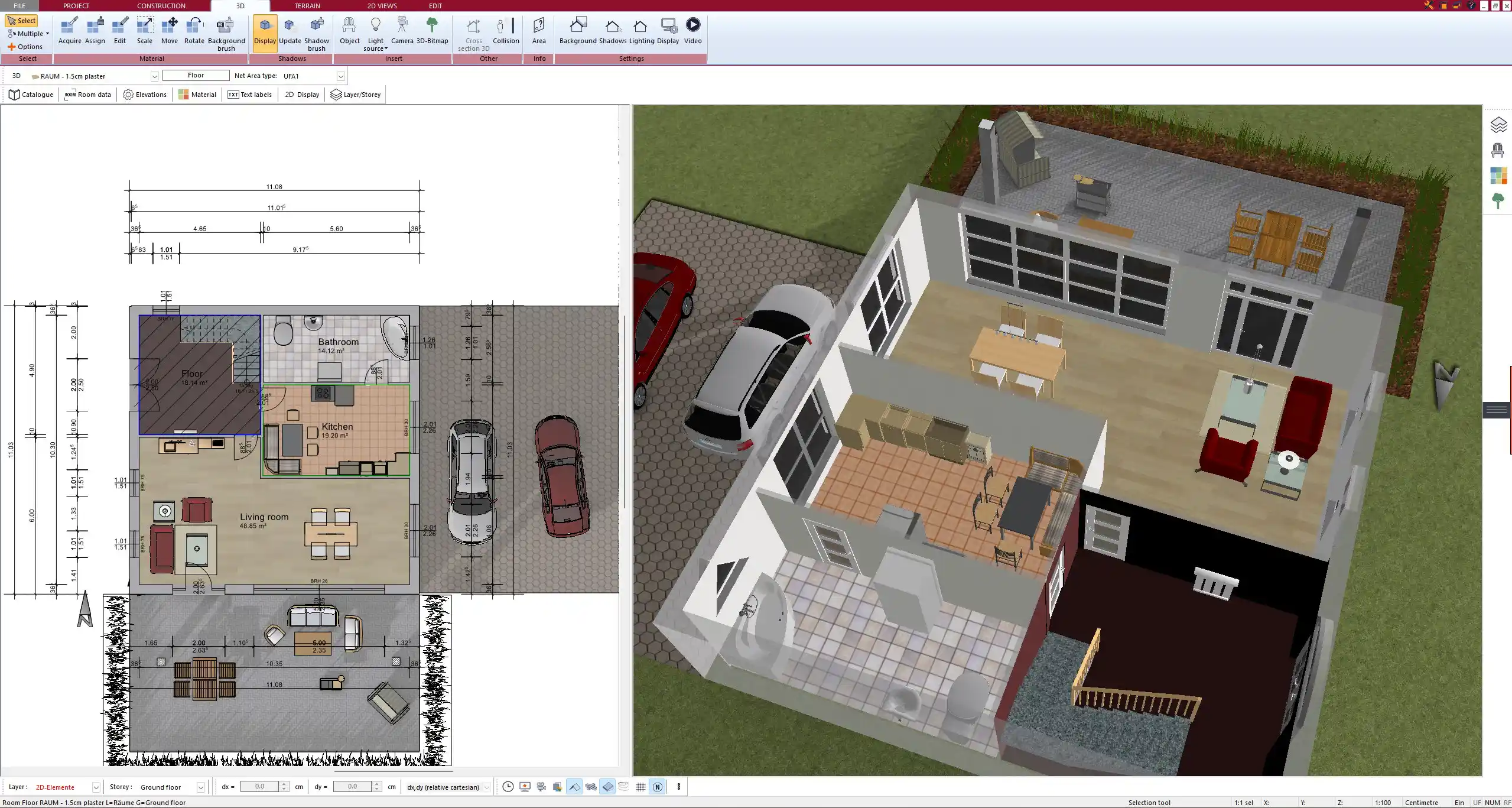
Plan7Architect is a dedicated house planning program. Instead of a general CAD system with an architecture module, you get one interface that is made for houses. You draw a wall, and it has a thickness, layers and a height. You place a window, and the opening is created automatically. Every change in the floor plan updates the 3D model, the sections and the elevations at the same time, so you never draw anything twice and never wait for a manual recompute.
Precise Planning Without Sketches and Constraints
Precision does not get lost when you leave FreeCAD. You enter exact lengths, angles and distances, build walls from several layers, place doors and windows with exact sizes and positions, and the dimensions are created automatically. Guide lines and virtual walls help you lay out the plan before you build it. You can work in feet and inches or in meters and centimeters and switch at any time in the settings.
Real Building Tools Without Add-Ons
Everything you need for a house project is built into the program:
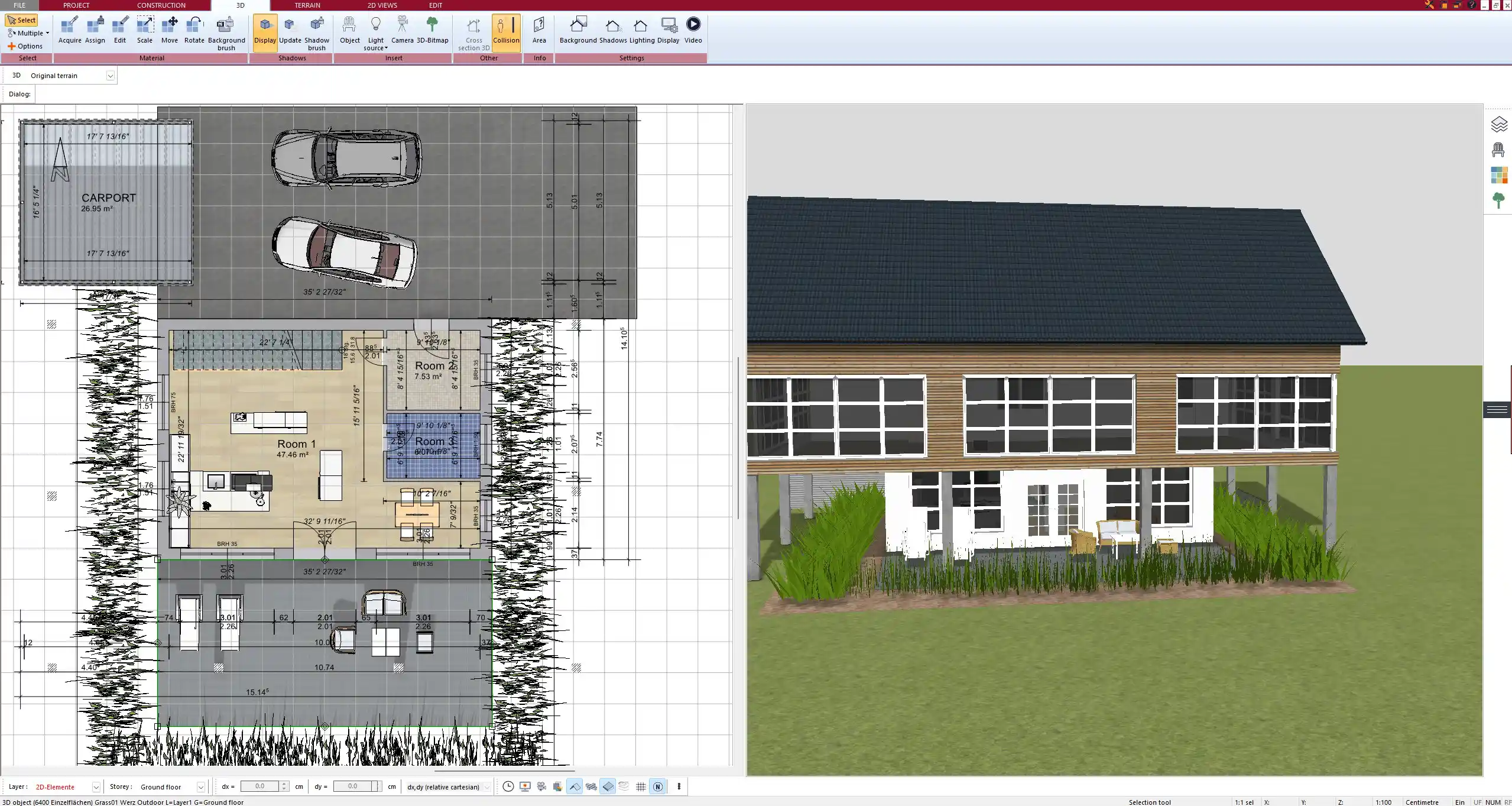
- Automatic roof construction for gable, hip, shed, flat and mansard roofs, including dormers
- Terrain modeling with contour lines and sloped lots
- Timber construction tools and custom beam structures
- Foundations, slabs, stairs and unlimited floors and buildings in one project
- Custom windows and doors
- Electrical, heating and plumbing planning
- Detailed layer management and different plan variants
- Living and usable area calculation
Every element you adjust, from a wall structure to a roof, a window, a door, a beam or a foundation, can be saved to the catalog and reused in the next project.
Construction Drawings and Permit Plans
Sections, elevations and complete plan sheets with title blocks are created directly from your model, without a separate drawing workbench. You can print them to scale, save them as PDF or export them as DWG/DXF for your architect, engineer or builder. You can also import DWG/DXF files, for example an existing plan or a site survey.
Furniture Library and 3D Warehouse Import
Plan7Architect comes with an extensive furniture and object library, so you do not have to search for models before you can furnish a room. You can also import models from the SketchUp 3D Warehouse. Our guide Importing 3D Objects from the SketchUp 3D Warehouse shows how it works.
3D Walkthrough and Renderings
You can walk through your design in 3D at any time. For photorealistic images and videos, you export the model to Twinmotion with all textures included.
Pricing
FreeCAD costs nothing, but a house plan in FreeCAD costs a lot of time. Plan7Architect Pro is a one-time purchase of $169.99 with a lifetime license and no subscription, and it can be activated on up to 3 PCs. Professional programs with similar house planning tools, such as Chief Architect Premier, cost $1,995 every year.
2. Sweet Home 3D: Best Free Option for Simple Interior Layouts
Price: free, open source
Platform: Windows, Mac, Linux and a browser version
Best for: simple apartment and room layouts on a zero budget
Sweet Home 3D is much easier than FreeCAD: you draw walls and rooms in 2D, place furniture from a catalog and see the result in 3D right away. For furnishing an apartment it is a good free choice.
For a house project it reaches its limits quickly. There is no real roof tool, no terrain, no sections or elevations and no DWG export without additional plugins. Read more on our Sweet Home 3D alternative page.
3. Blender: Best Free Tool for 3D Modeling and Visualization
Price: free, open source
Platform: Windows, Mac and Linux
Best for: 3D artists who want free modeling, rendering and animation
Blender is the most powerful free 3D program available. Its modeling, rendering and animation tools are far ahead of FreeCAD, and it is a great choice if you mainly want beautiful images of a design.
For house planning, Blender is not an architecture program. Floor plans, dimensions and construction drawings need add-ons, it is mesh-based rather than parametric, and the learning curve is steep.
4. SketchUp: Best for Quick 3D Models
Price: free web version for personal use, Go $129 per year, Pro $399 per year
Platform: browser, Windows and Mac (Pro)
Best for: users who want to model 3D shapes quickly and intuitively
SketchUp is much faster to learn than FreeCAD and has a huge library of free models in the 3D Warehouse. For concepts, furniture and woodworking it is very popular.
It is a general 3D modeling program, though: walls and openings are drawn from lines and faces, and construction drawings are set up by hand in LayOut, which needs a paid plan. Read more in Construction Drawings in SketchUp: Is It a Good Idea?
5. AutoCAD LT: Best for Classic 2D Drafting
Price: $540 per year or $70 per month
Platform: Windows and Mac
Best for: drafters and builders who mainly need precise 2D drawings in the DWG format
AutoCAD LT is the standard for 2D technical drawings, and DWG is the format most architects and engineers use. If you come from FreeCAD and mainly want clean 2D drafting with a familiar CAD workflow, it is a solid choice.
For house planning it is a step back: AutoCAD LT has no 3D model, no walls as building objects and no automatic sections or elevations. Every line is drawn by hand, and it is a subscription.
6. Chief Architect Premier: Professional Residential Design Software
Price: $1,995 per year or $229 per month
Platform: Windows and Mac
Best for: professional residential designers and builders who produce construction documents every day
Chief Architect Premier is a professional program for residential design with automatic building tools, framing, construction documents and a large library. It is made for professionals who use it every day.
For private builders, the subscription is the main drawback: after one year you have paid more than ten times the price of Plan7Architect Pro. If you are comparing both, see our Chief Architect alternative page.
7. Archicad: Professional BIM for Architecture Offices
Price: Studio $2,414 per year, Collaborate $2,840 per year
Platform: Windows and Mac
Best for: architecture offices that want full BIM with a design-oriented workflow
Archicad is professional BIM software with walls, slabs, roofs, stairs, terrain and a strong documentation workflow. If you like the BIM idea in FreeCAD but want a polished professional tool, Archicad is one of the best on the market.
It is made for architecture offices, is only sold as a subscription to new customers and takes a long time to learn, so for a single house it is usually far more than you need. Read more on our Archicad alternatives page.
How to Choose the Right FreeCAD Alternative
- You want to plan a real house, with floor plans, roof and permit drawings: choose a dedicated house planning program like Plan7Architect.
- You only want to furnish rooms for free: Sweet Home 3D is enough.
- You mainly want to model and render for free: Blender is the best free tool, but not for floor plans.
- You need classic 2D technical drawings: AutoCAD LT is the standard for DWG drafting.
- You work in an architecture office with BIM projects: Archicad or Chief Architect Premier, if the subscription costs fit your budget.
Plan Your House with Plan7Architect
With Plan7Architect you create professional floor plans, 3D models, sections, elevations and complete permit drawings in one program, without CAD experience, without workbenches and without a subscription. Our video tutorials take you from the first wall to the finished plan. Every purchase comes with a 14-day right of withdrawal: if the software is not what you expected, you can simply cancel your purchase by email, so you can test it on your own project without risk.

Plan your project with Plan7Architect

Plan7Architect Pro 5 for $169.99
You don’t need any prior experience because the software has been specifically designed for beginners. The planning process is carried out in 5 simple steps:
1. Draw Walls

2. Windows & Doors

3. Floors & Roof

4. Textures & 3D Objects

5. Plan for the Building Permit

6. Export the Floor Plan as a 3D Model for Twinmotion

- – Compliant with international construction standards
- – Usable on 3 PCs simultaneously
- – Option for consultation with an architect
- – Comprehensive user manual
- – Regular updates
- – Video tutorials
- – Millions of 3D objects available


