

3D Building Plan Maker – Plan7Architect

If you are looking for a professional 3D building plan maker that allows you to create detailed floor plans, realistic 3D models, sections, elevations, and complete construction drawings, Plan7Architect provides all of this in one software solution. It combines 2D drafting precision with full 3D building visualization, allowing you to design residential or commercial projects from the first wall layout to the finished building model.

With Plan7Architect, you can create dimensioned floor plans, define wall constructions, design roofs, add windows and doors, generate sections and elevations automatically, and explore your building in real-time 3D. The software supports both metric and imperial units, so you can work in meters and centimeters or in feet and inches depending on your location and project requirements.

It is a one-time purchase software and does not require a subscription. This makes it especially suitable for homeowners, contractors, and professionals who want long-term control over their building projects without ongoing costs.

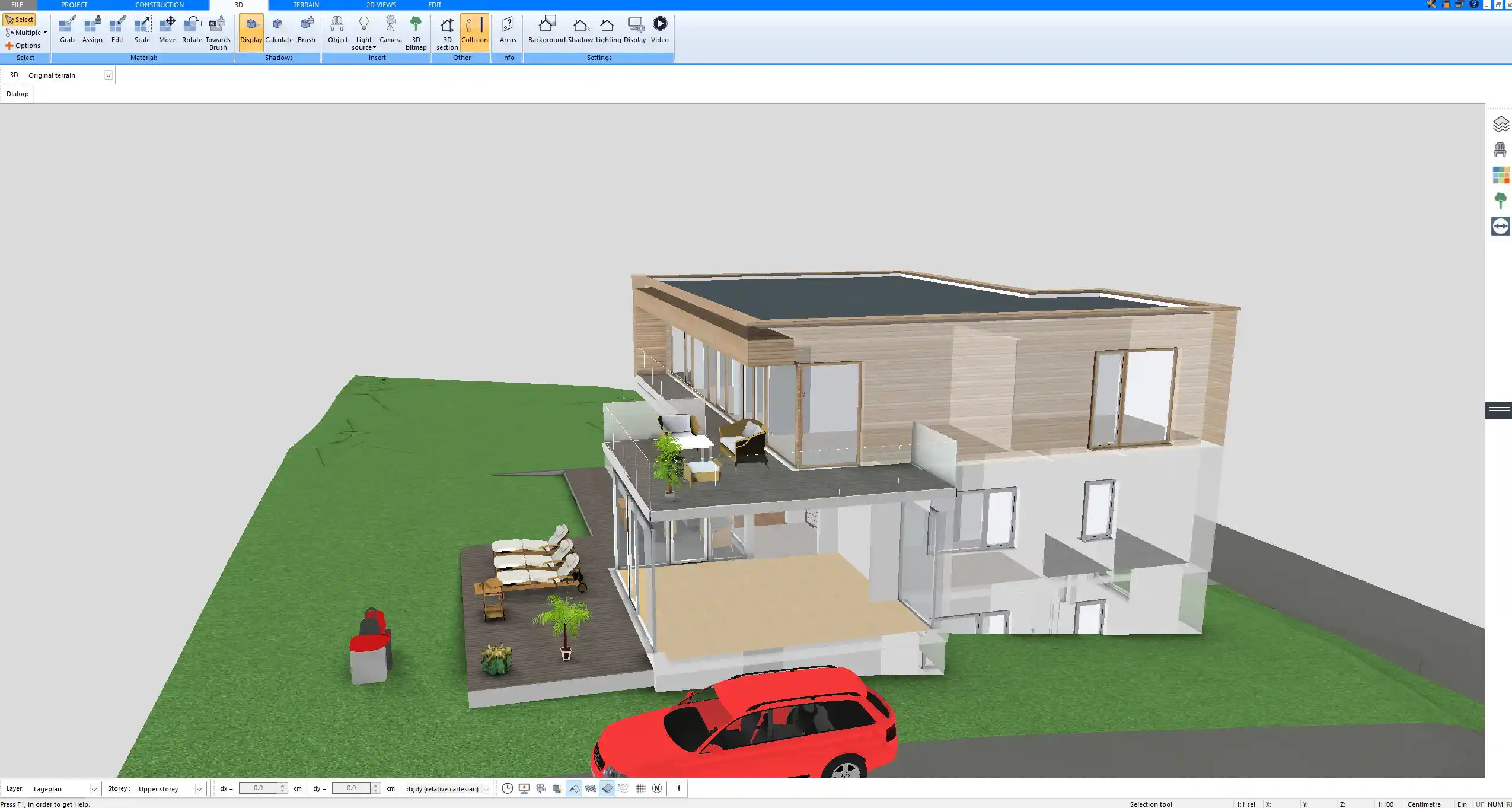
3D building model created with Plan7Architect – complete residential design with detailed roof structure and exterior walls

What Is a 3D Building Plan Maker?

A 3D building plan maker is software that allows you to design buildings in both two-dimensional and three-dimensional form. In traditional drafting, you would draw floor plans in 2D and then imagine how the building might look in real life. A modern 3D building plan maker connects these two worlds. Every wall you draw in 2D automatically exists in 3D.

In practical terms, this means:

  • You draw walls, rooms, and dimensions in a technical floor plan.

  • The software generates a complete three-dimensional building model at the same time.

  • Any change you make is reflected instantly in both views.

This approach significantly reduces planning mistakes. Instead of discovering issues during construction, you can identify and correct them during the design phase. You can see ceiling heights, roof slopes, stair placement, window proportions, and spatial relationships long before anything is built.

A 3D building plan maker is especially useful for:

  • Homeowners planning a new house

  • Property owners designing extensions or remodels

  • Contractors preparing layouts

  • Design-build professionals

  • Real estate developers evaluating project concepts

From experience, the ability to switch instantly between precise technical drawings and a realistic 3D model changes how confidently you make decisions.

Why Choose Plan7Architect as Your 3D Building Plan Maker?

Create Complete 2D and 3D Building Plans

Plan7Architect allows you to create:

  • Detailed floor plans with exact dimensions

  • Multi-story buildings

  • Basements and attic levels

  • Roof structures with different slopes and shapes

  • Interior layouts with furniture placement

  • Exterior views and facade planning

When you draw a wall in the floor plan, it immediately appears in the 3D model. You can define wall thickness, materials, and structural layers. You can design ceiling heights such as ten feet or three meters depending on your project. The software adapts to your chosen unit system.

This direct link between plan and model saves time and avoids inconsistencies between drawings.

Professional Construction Drawings

A true 3D building plan maker must go beyond visualization. Plan7Architect allows you to generate professional construction documents, including:

  • Fully dimensioned floor plans

  • Sections through the building

  • Exterior elevations

  • Detailed wall constructions

  • Printable layout sheets

You can export plans to PDF and common CAD formats such as DWG and DXF. This makes collaboration with architects, engineers, and contractors straightforward.

Below is an overview of typical outputs:

Output Type Purpose
Floor Plan Layout, dimensions, room distribution
Section Vertical cut through building
Elevation Exterior facade view
Roof Plan Roof geometry and slope layout
3D View Visual evaluation and presentation
PDF Export Printing and sharing
DWG and DXF Export CAD collaboration

This level of documentation makes the software suitable for serious building projects.

Real-Time 3D Visualization

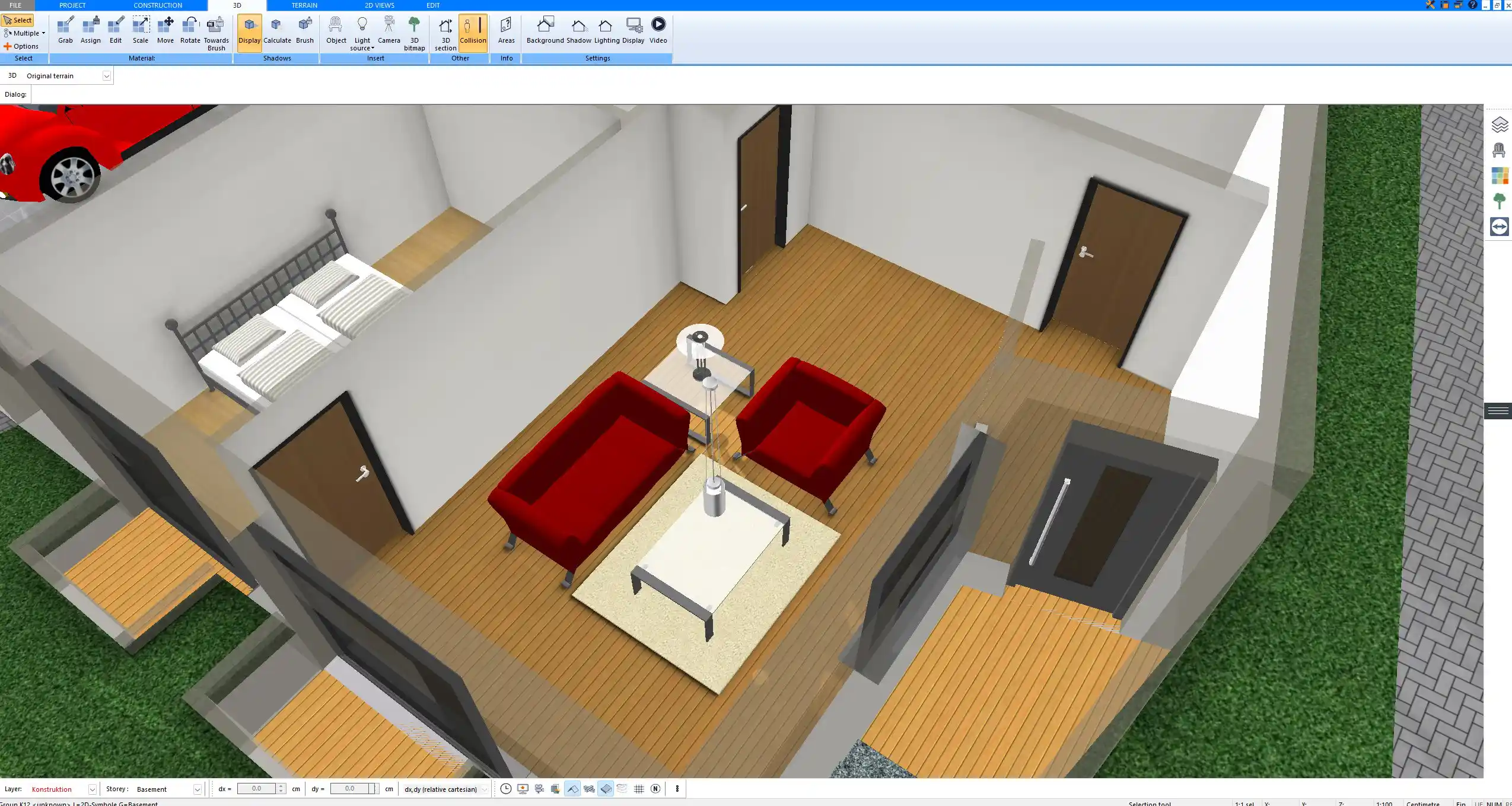
As soon as you start drawing, you can switch to the 3D view and walk through your building. This is not a static rendering. It is a live model.

You can:

  • Enter rooms in a first-person perspective

  • Rotate around the exterior

  • Adjust windows and doors visually

  • Modify roof shapes and instantly see the result

  • Simulate daylight and shadows

This feature is particularly valuable when evaluating room proportions, window heights, or stair positioning. Seeing a space in 3D before construction helps avoid costly corrections later.

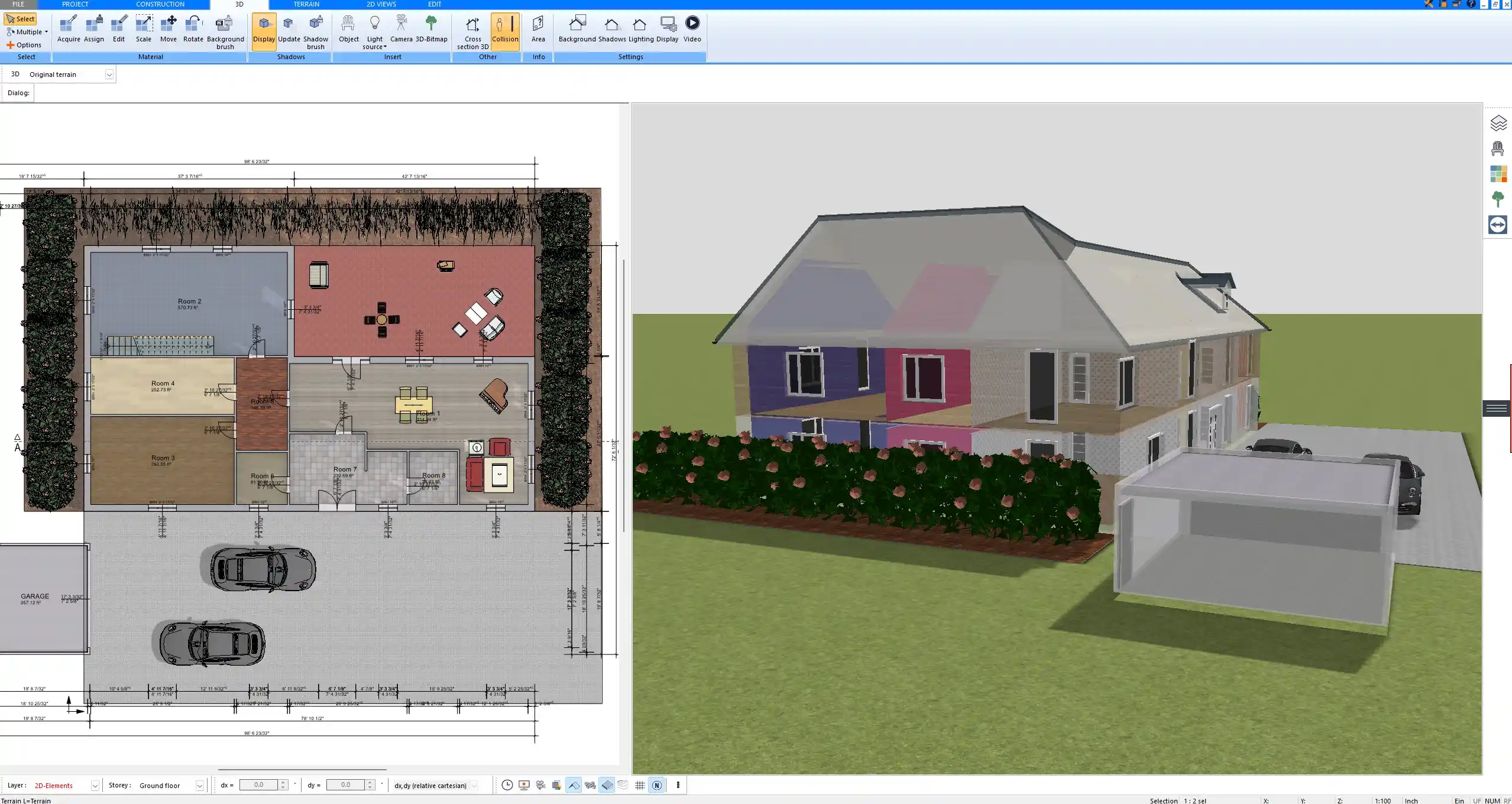
Floor plan drafted in Plan7Architect showing precise wall dimensions, room layout, and structural elements

Works With Metric and Imperial Units

Plan7Architect allows you to switch between metric and imperial units inside the software. You can design in meters and centimeters or in feet and inches depending on your location or client requirements.

This flexibility makes the software suitable for projects in:

  • United States

  • Canada

  • United Kingdom

  • Australia

  • European countries

  • International projects

The unit system can be adjusted in the settings without affecting the overall design workflow.

What Can You Design With Plan7Architect?

The software is not limited to a single building type. You can design:

  • Single-family houses

  • Multi-level residential buildings

  • Barn-style houses

  • Lake houses and cabins

  • Garages and workshops

  • Home extensions

  • Garden buildings

  • Small commercial structures

You can define multiple floors above ground and basement levels below ground. Ceiling heights, wall thicknesses, and roof slopes can be customized according to your structural concept.

In renovation projects, you can replicate an existing structure and then modify it step by step, adjusting walls, adding new openings, or redesigning roof geometry.

Tip

When working on a renovation, I recommend modeling the existing building first as accurately as possible. This provides a reliable base for planning structural changes and avoids miscalculations later.

Step by Step: How to Create a 3D Building Plan

Step 1 – Draw the Floor Plan in 2D

You start by defining the outer walls of your building. Using the wall tool, you draw the layout directly in the floor plan view. You can enter exact dimensions while drawing.

Rooms can be labeled, and internal walls are added to define the interior structure. At this stage, you establish:

  • Building footprint

  • Room layout

  • Wall thickness

  • Door openings

  • Window positions

Step 2 – Insert Windows, Doors and Stairs

Using the object library, you can insert windows, doors, and stairs. Each element can be customized in size and placement.

You can adjust:

  • Window width and height

  • Door type and opening direction

  • Stair width and step configuration

Changes are reflected immediately in both the 2D and 3D views.

Step 3 – Design the Roof

Plan7Architect provides automatic and manual roof tools. You can define roof slopes and overhangs and generate different roof forms.

Common roof types include:

  • Gable roof

  • Hip roof

  • Flat roof

  • Combination roof structures

Roof adjustments are visible in real time in the 3D model.

Step 4 – Switch to 3D View

At any time, you can switch to the 3D view to inspect the building. You can move around freely and evaluate proportions, facade appearance, and spatial relationships.

This step is essential for identifying design issues early.

Step 5 – Create Sections and Elevations

With a few clicks, you can generate sections and elevations from your model. These drawings are derived directly from the 3D building.

You can place dimensions and prepare the drawings for printing or export.

Real-time 3D visualization generated in Plan7Architect during the planning process

Is Plan7Architect Easy to Use?

Plan7Architect is not a simplified game-like application. It is professional planning software. There is a learning curve, especially if you have never worked with CAD software before.

However, the interface is structured logically. Most users understand the basic workflow after watching a few tutorial videos and practicing for a short time.

If you are used to drawing house plans on paper, you will appreciate the precision tools and automatic dimensioning. Instead of redrawing entire layouts, you can modify elements quickly.

Available learning resources include:

  • Video tutorials

  • Step-by-step guides

  • Support assistance

  • Community discussions

In my experience, the initial investment in learning the system pays off quickly once you realize how efficiently you can revise and refine your building plans.

Comparison: Plan7Architect vs Other 3D Building Plan Makers

Many software solutions focus primarily on visual rendering. They create attractive images but lack detailed construction drawing capabilities.

Plan7Architect combines visualization and technical planning.

Feature Plan7Architect Typical Visual Planner
Detailed construction drawings Yes Limited
Real wall layer definitions Yes Often simplified
Sections and elevations Yes Often manual or basic
One-time purchase Yes Often subscription
CAD export formats Yes Limited or none

This makes it suitable for serious building planning rather than only interior visualization.

Can You Use It for Permit or Building Approval Plans?

Plan7Architect allows you to create professional construction drawings that can serve as the basis for building permit submissions. However, in many regions, local regulations require a licensed architect or engineer to review and stamp the plans.

The software provides the technical foundation. The final approval depends on local building authorities and professional licensing requirements.

Technical Requirements

Plan7Architect runs on Windows-based systems. For smooth 3D performance, a modern processor and sufficient graphics capability are recommended.

The software can also run on Mac systems using virtualization solutions. Performance depends on the hardware configuration.

Who Is This Software For?

Plan7Architect is suitable for:

  • Homeowners who want full control over their design

  • Contractors planning construction projects

  • Retired professionals creating personal building projects

  • Design-build companies

  • Real estate developers evaluating building concepts

If you want to visualize, plan, and document a building project without committing to expensive subscription software, this solution offers a professional and flexible approach.

Plan your project with Plan7Architect

Plan7Architect Pro

Plan7Architect Pro 5 for $109.99

You don’t need any prior experience because the software has been specifically designed for beginners. The planning process is carried out in 5 simple steps:

1. Draw Walls

Create your 2D floor plan by accurately drawing and adjusting rooms and walls for your home design.

2. Windows & Doors

Optimize your space layout with perfectly fitting door and window elements.

3. Floors & Roof

Visualize different levels and roof types for your home design.

4. Textures & 3D Objects

Choose materials and textures to customize floors, walls, and 3D objects individually for a realistic representation of your design.

5. Plan for the Building Permit

Sections and views for the building application can be created with Plan7Architect (1)
Create professional construction drawings with elevations, sections, and complete plan compilations.

6. Export the Floor Plan as a 3D Model for Twinmotion

Visualize your project with cutting-edge 3D technology and create high-quality image renderings and videos using Twinmotion by Epic Games.


  • – Compliant with international construction standards
  • – Usable on 3 PCs simultaneously
  • – Option for consultation with an architect
  • – Comprehensive user manual
  • – Regular updates
  • – Video tutorials
  • – Millions of 3D objects available

Why Thousands of Builders Prefer Plan7Architect

Why choose Plan7Architect over other home design tools?

14-Day Money-Back Guarantee
No questions asked. Just email us within 14 days if you’re not satisfied.
One-time payment – no subscription
Own the software forever. No hidden costs. No monthly fees. Updates are optional.
Based on $2,500 professional architecture software
Plan7Architect is an optimized version — used by professionals and private users alike.
Supports international building standards
Adaptable to US, UK, Canadian, Australian, and European requirements.
Works offline – use on up to 3 devices
No internet required. Install on up to 3 computers – ideal for home and office use.
Metric & imperial units
Switch freely between feet/inches or meters/centimeters — perfect for global use.
++
All key export/import formats included
DWG, DXF, OBJ, 3DS, STL, PDF, image export/import, and SketchUp import — for smooth collaboration.
ii
Create real building permit documents
Generate floor plans, elevations, cross-sections, and full construction drawings.
Supports wood framing for walls and roofs
Design wall and roof structures, gables, dormers, and freely constructed wood frameworks.
Easy learning curve with full support
Includes video tutorials, ticket system, detailed PDF manual, sample projects, and access to our customer forum.
Excellent verified reviews
Top ratings on Trusted Shops and Amazon.
Ongoing development – 3–4 updates per year
Always improving, with a modern 3D engine and regular feature upgrades.

Watch how a complete house is planned from start to finish – in under 25 minutes

Detailed House Planning (25 Min)

Small Home Planning Demo (12 Min)

The 3 Plan7Architects

Sale!
Plan7Architect Pro
Original price was: $259.99.Current price is: $109.99.

Verified Customer Reviews

Verified Customer Reviews

Trusted Shops:

Home » Building Plan Wiki » 3D Building Plan Maker – Plan7Architect
Youtube
Select your currency