Software for Architectural Design & Drawings

If you are looking for professional software for architectural design and construction drawings, Plan7Architect is a complete solution that allows you to create detailed floor plans, permit-ready construction documents, sections, elevations and full 3D visualizations within one system. It is built for real building projects, not just conceptual sketches.

With Plan7Architect, you can design residential houses, extensions, renovations, container homes, barndominiums and multi-story buildings. The software supports both metric and imperial units, so you can work in meters or feet depending on your location. You can switch units inside the program at any time.

Unlike many professional CAD systems, Plan7Architect is available as a one-time purchase. There is no subscription model and no project lock if you stop paying.

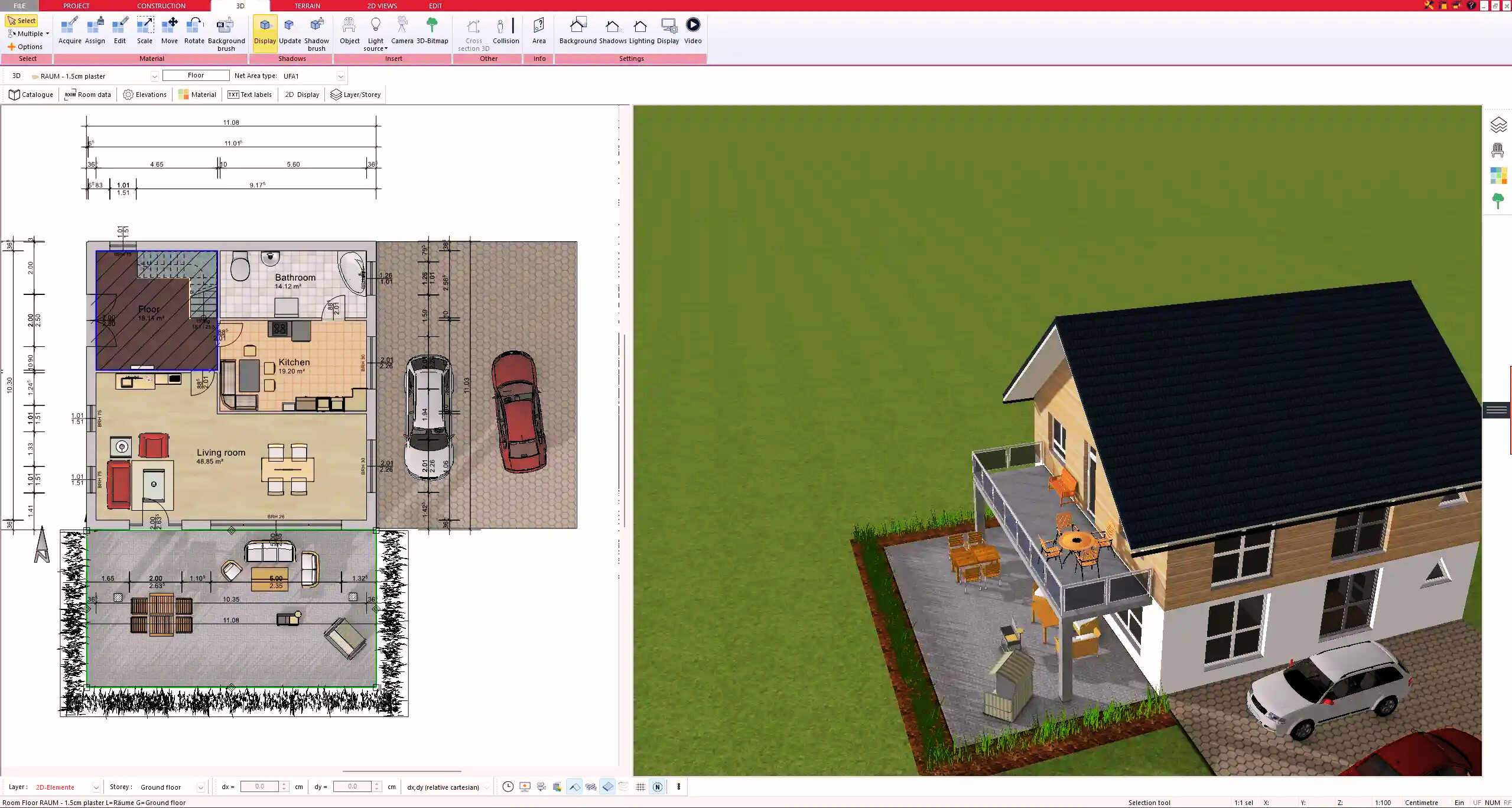
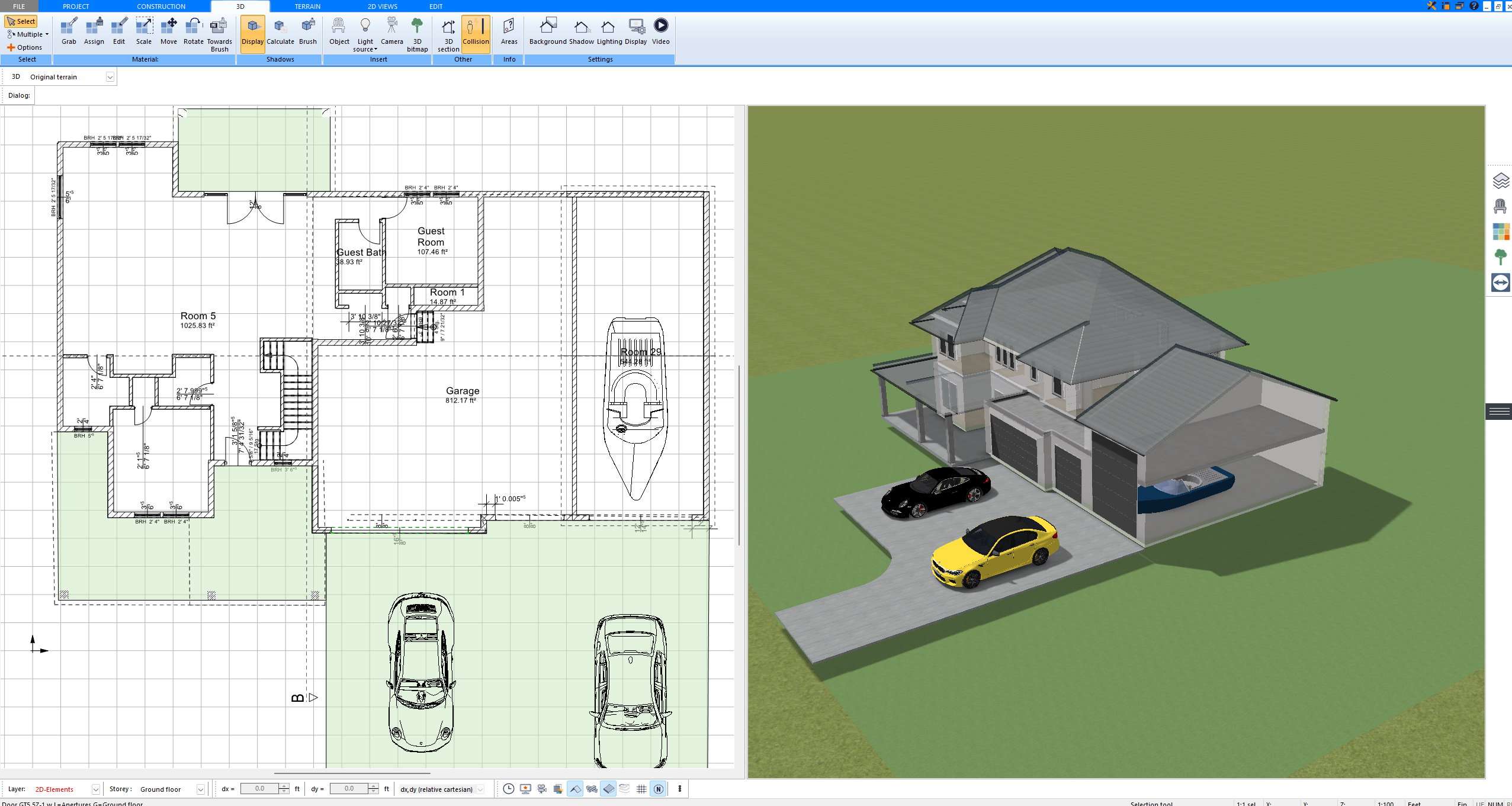
Floor plan created with Plan7Architect showing detailed wall construction, room dimensions, and structural layou

What Can You Create with Plan7Architect?

Plan7Architect is not limited to basic floor plans. It is a complete architectural planning tool that supports real construction projects from concept to documentation.

Floor Plans in 2D

The 2D planning mode is where every project starts. You can draw exterior and interior walls with precise dimensions and define wall thickness individually. Whether you plan a wall with a thickness of 30 cm or 12 inches, the software allows you to adjust it exactly as required.

In 2D you can create:

  • Exterior and interior walls with custom thickness

  • Multi-level buildings with several floors

  • Doors and windows with adjustable dimensions

  • Staircases with correct rise and run settings

  • Room labels and automatic area calculation

  • Structural elements such as columns and beams

You can plan using interior dimensions or exterior dimensions. Interactive dimension tools allow you to modify wall segments directly by typing the exact value you need.

Tip: Activate the interactive dimension tools in the bottom toolbar. This allows you to edit wall lengths and interior dimensions directly on the drawing without opening additional menus.

Construction Drawings for Permit Submission

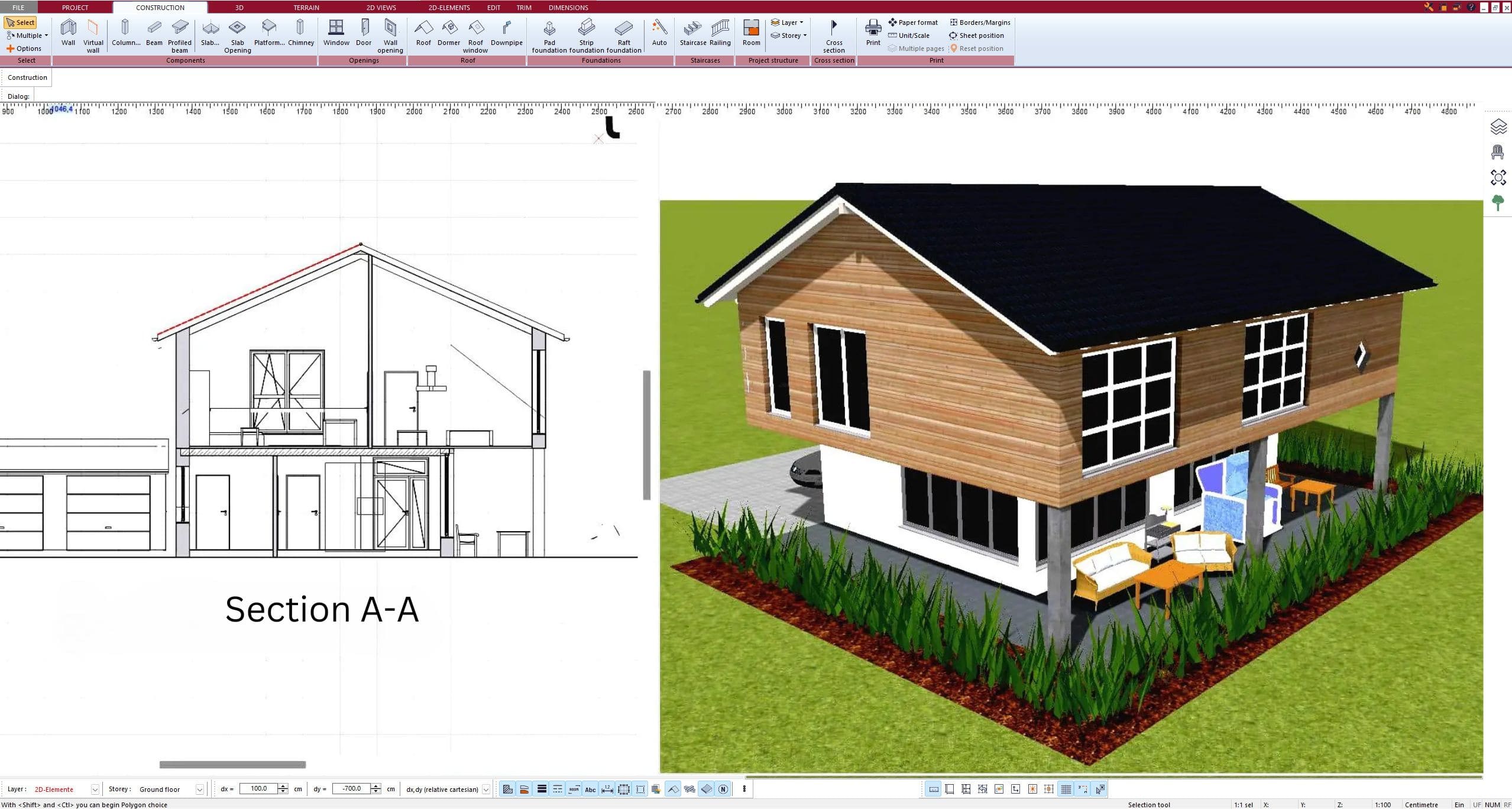
Plan7Architect allows you to generate technical drawings required for building permits and contractor communication.

You can create:

  • Dimensioned floor plans

  • Building sections

  • Elevations from all sides

  • Roof plans

  • Foundation layouts

  • Detailed wall sections

All drawings can be printed to scale and exported as PDF files. You can also export to DWG or DXF formats for collaboration with architects or engineers.

If a licensed professional stamp is required in your country or state, you can create the drawings in Plan7Architect and then submit them to a local architect or engineer for review and stamping.

3D Architectural Design and Visualization

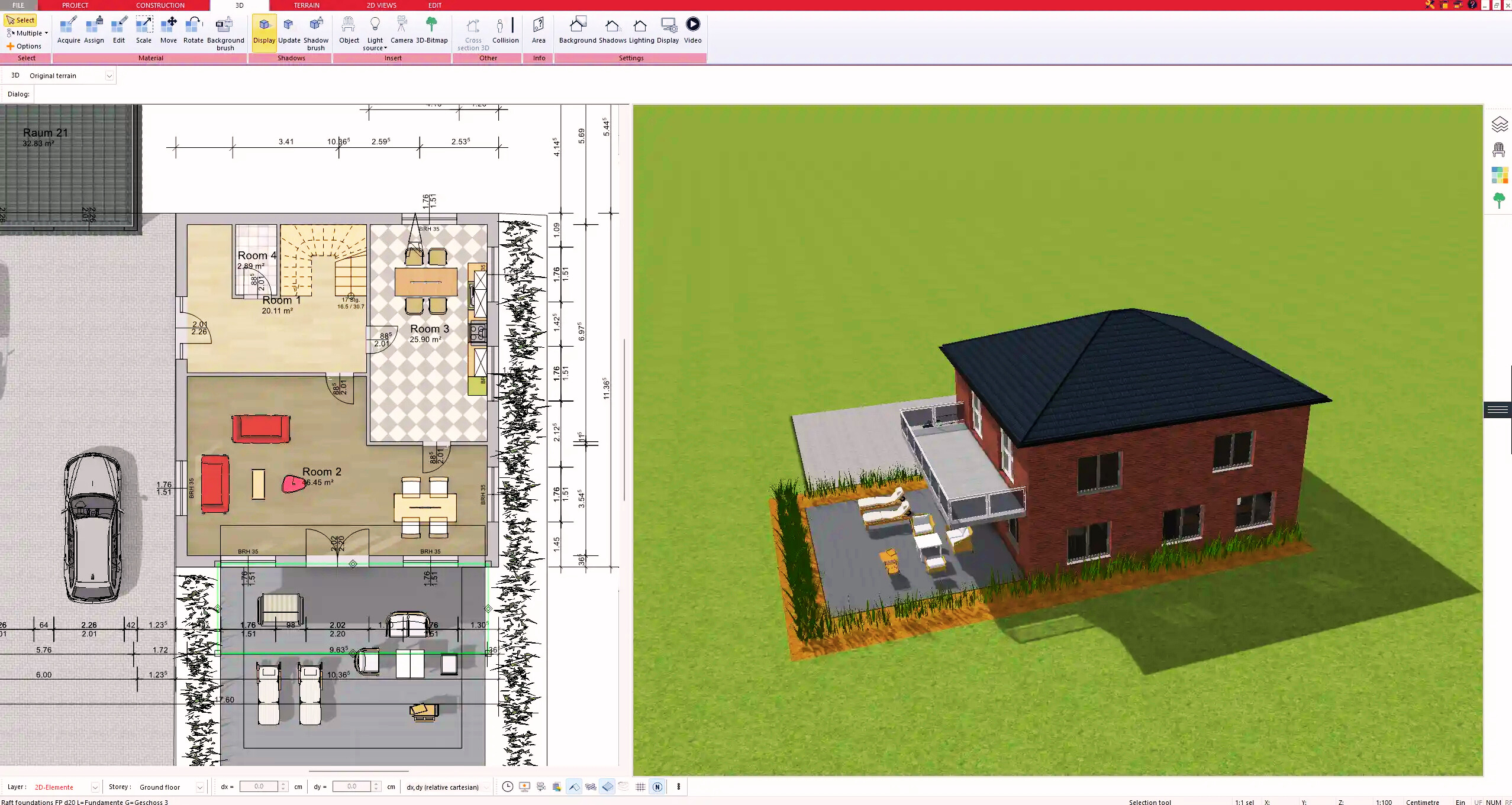
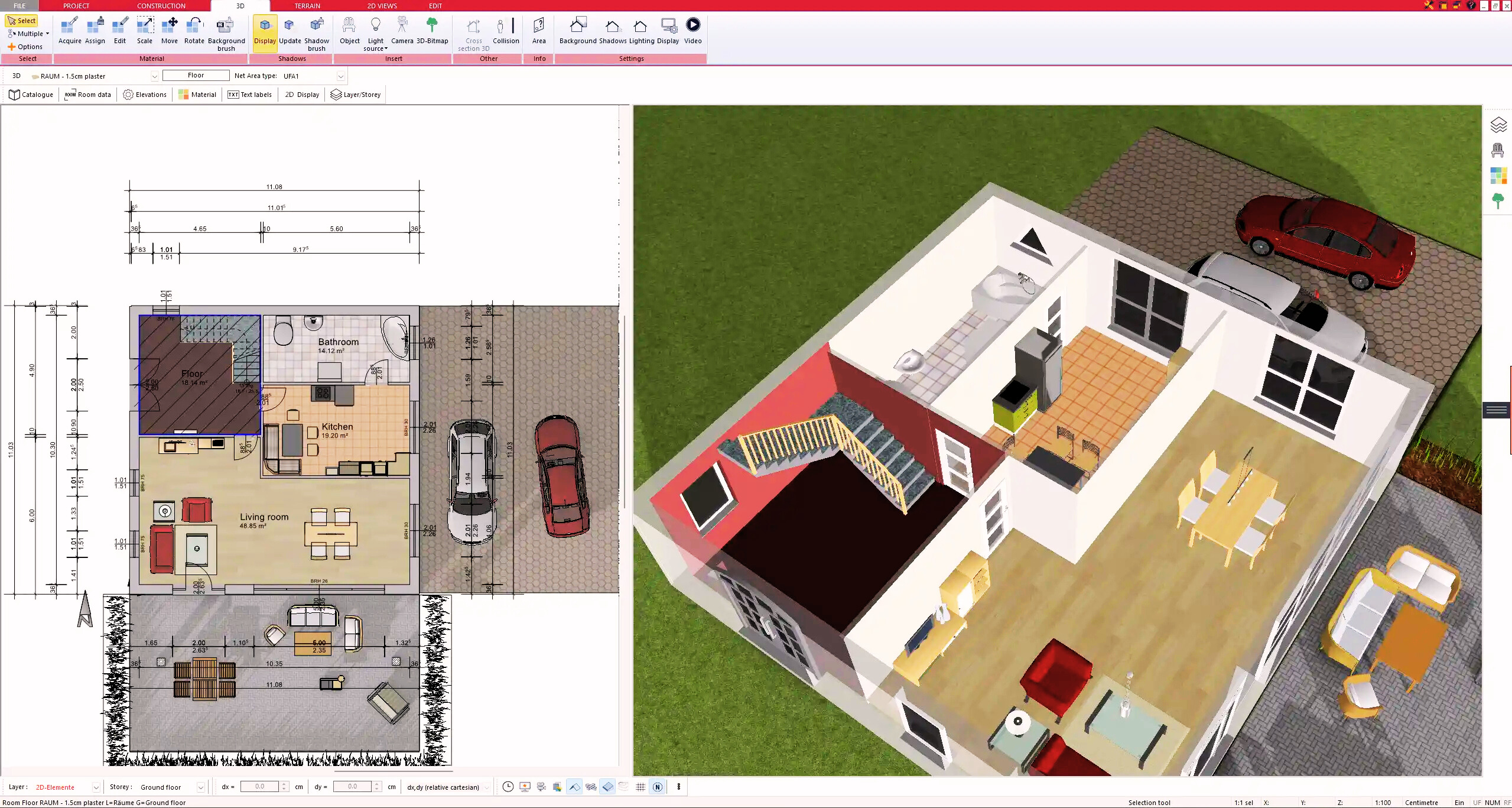
The 3D view updates in real time while you work in 2D. You can rotate the model, zoom in and inspect the building from every angle.

In 3D you can:

  • Visualize exterior facades

  • Walk through interior spaces

  • Adjust ceiling heights such as 2.7 m or 9 ft

  • Model roof shapes and dormers

  • Add terrain and landscaping

  • Simulate sunlight and shadows

This is especially useful for detecting design mistakes early. In my experience, many spatial problems become visible immediately in 3D that are not obvious in a flat floor plan.

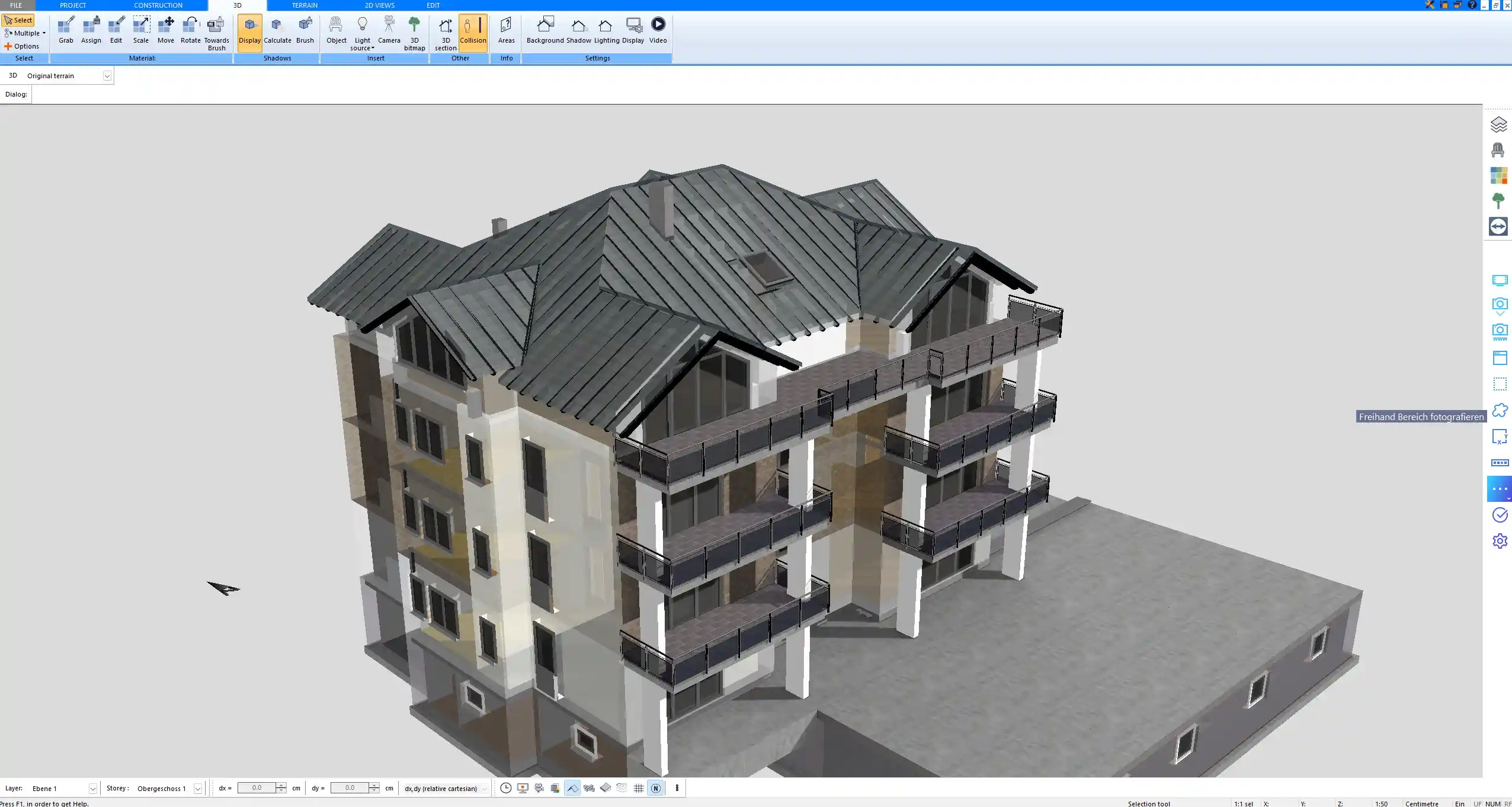
3D architectural model built in Plan7Architect illustrating realistic building proportions and roof structure

Who Is This Software For?

Plan7Architect is designed for people who need professional results without paying thousands for enterprise CAD systems.

It is suitable for:

  • Private homeowners planning their own house

  • Renovation and remodeling projects

  • House extensions and additions

  • Container home planning

  • Barndominium designs

  • Contractors transitioning from paper drawings

  • Small architectural offices

  • Real estate developers

  • Designers who need technical construction drawings

If you are currently drawing on grid paper or using a simple 3D modeling tool that does not generate proper construction drawings, Plan7Architect fills that gap.

Key Features That Matter in Real Projects

Professional Wall System

Walls in Plan7Architect are not simple lines. You can define multi-layer wall constructions with structural and insulation layers. Wall thickness can be adjusted individually for each wall.

Features include:

  • Multi-layer wall definitions

  • Adjustable wall thickness

  • Automatic wall intersections

  • Precise corner connections

  • Interior dimension planning

This level of detail is important when you plan real construction projects where every centimeter or inch matters.

Roof Construction Tools

Roof design is fully integrated. You can define roof pitch and overhang values precisely.

Supported roof types include:

  • Gable roofs

  • Hip roofs

  • Shed roofs

  • Multi-surface roof combinations

  • Dormers and roof extensions

You can set exact roof angles and adjust ridge heights. The software automatically adapts the roof to the building geometry.

Precise Dimension Control

Precision is critical in architectural planning.

You can:

  • Modify wall lengths by typing exact values

  • Set custom ceiling heights per floor

  • Define floor thickness

  • Control stair dimensions

  • Plan multi-story buildings

Both metric and imperial units are supported. You can switch between unit systems inside the program settings.

Note: Always double-check local building codes regarding ceiling heights and structural requirements before submitting plans.

Import and Export Options

Plan7Architect supports several file formats for collaboration.

Import options:

  • DWG

  • DXF

  • 3DS

  • OBJ

Export options:

  • PDF

  • DWG

  • DXF

  • Image formats

Direct import of Revit files is not supported. However, a Revit file can be exported as DWG or DXF and then imported into Plan7Architect.

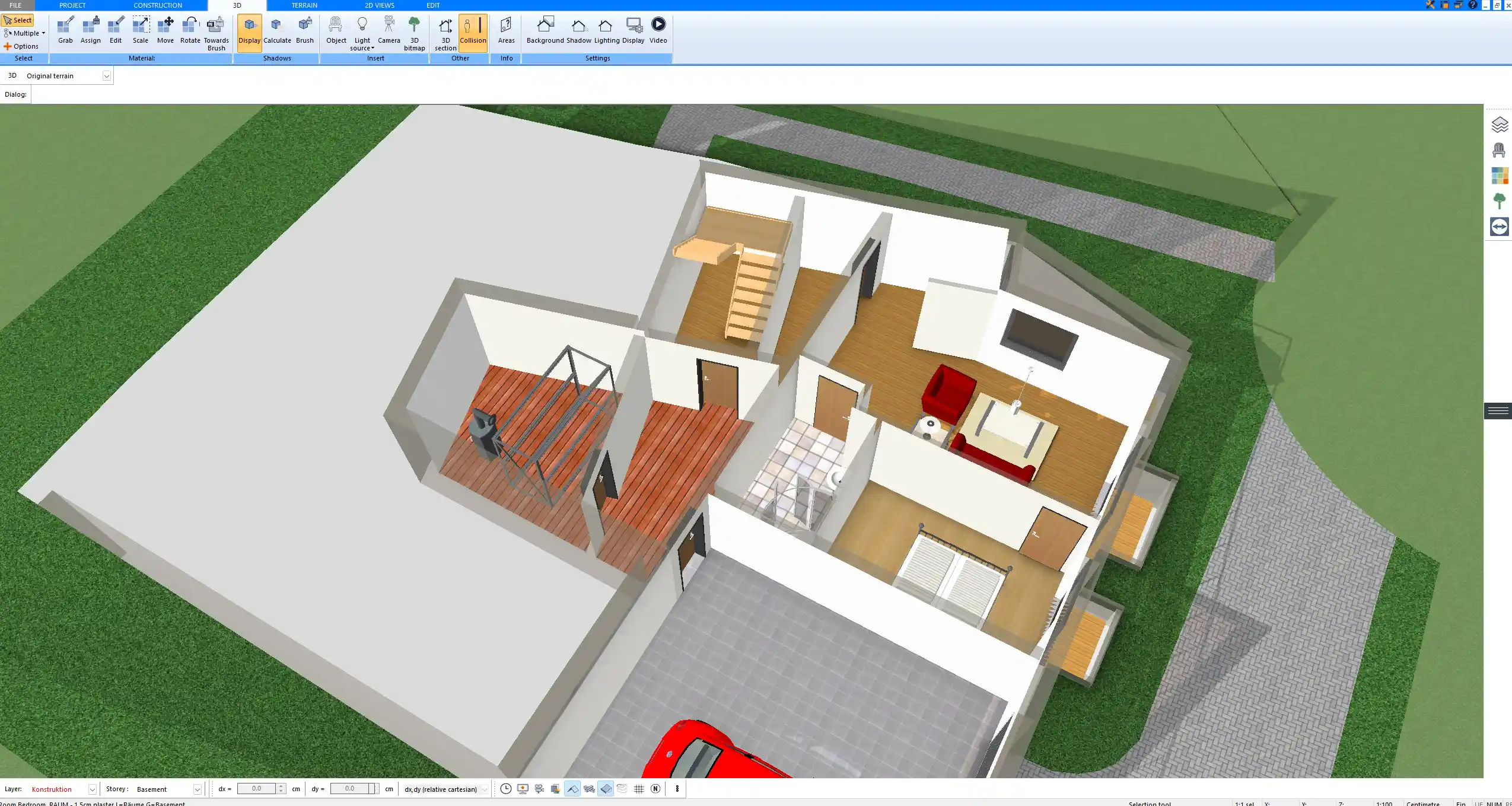
Interior 3D visualization created with Plan7Architect showing room layout and ceiling height configuration

Metric and Imperial Units for International Use

Plan7Architect is used in the United States, Canada, the United Kingdom, Australia and throughout Europe. The software allows you to work in either metric units or imperial units.

You can:

  • Switch between meters and feet

  • Adjust dimension display formats

  • Print scaled drawings according to regional standards

This flexibility makes it suitable for international users without requiring separate versions.

Is Plan7Architect Easy to Use?

Plan7Architect is not a casual game. It is real architectural software. There is a learning curve, especially if you have never worked with planning software before.

Most users become comfortable after watching one to two hours of tutorial videos and practicing with a small test project.

You have access to:

  • Video tutorials

  • Built-in help system

  • Support ticket system

  • Community discussions

If you approach it with the mindset of learning a professional tool, you will quickly understand the logic behind it.

Common Questions Before Buying

Can I Use It on Multiple Computers?

A license can typically be activated on more than one computer, depending on the license terms. Additional activations can be requested if needed.

Does It Run on Mac?

Plan7Architect is a Windows-based software. On Mac systems, it can be used through virtualization software that allows Windows to run on macOS.

Can I Create Stamped Plans?

You can create complete construction drawings. If your region requires a licensed architect or engineer stamp, you can submit your drawings to a local professional for review and stamping.

Is There a Trial Version?

The licensing model is based on a one-time purchase. Details about trial availability depend on the current offer structure.

Can I Design Plumbing and Electrical Layouts?

You can place symbols for outlets, switches and lighting elements. For highly detailed engineering calculations, specialized MEP software may still be required.

Comparison with Other Architectural Software

There is a clear gap in the market between very simple home design apps and extremely expensive professional CAD systems.

Plan7Architect positions itself between these extremes.

It provides:

  • Real construction drawing capability

  • Professional wall and roof systems

  • 3D visualization

  • Export formats for collaboration

  • Affordable pricing

  • No subscription model

It does not aim to replace large enterprise BIM systems used by multinational architectural firms. It focuses on delivering practical tools for real building projects without unnecessary complexity.

Is Plan7Architect the Right Software for You?

If you want to create professional architectural drawings, detailed floor plans and realistic 3D visualizations without paying ongoing subscription fees, Plan7Architect is a strong choice.

If you are looking for a simple interior decoration tool with no technical depth, it may not be the right fit.

If you are serious about planning a real construction project and want full control over dimensions, wall structures, roof geometry and documentation, Plan7Architect provides the necessary tools in one integrated system.

Plan your project with Plan7Architect
Plan7Architect Pro

Plan7Architect Pro 5 for $109.99

You don’t need any prior experience because the software has been specifically designed for beginners. The planning process is carried out in 5 simple steps:

1. Draw Walls
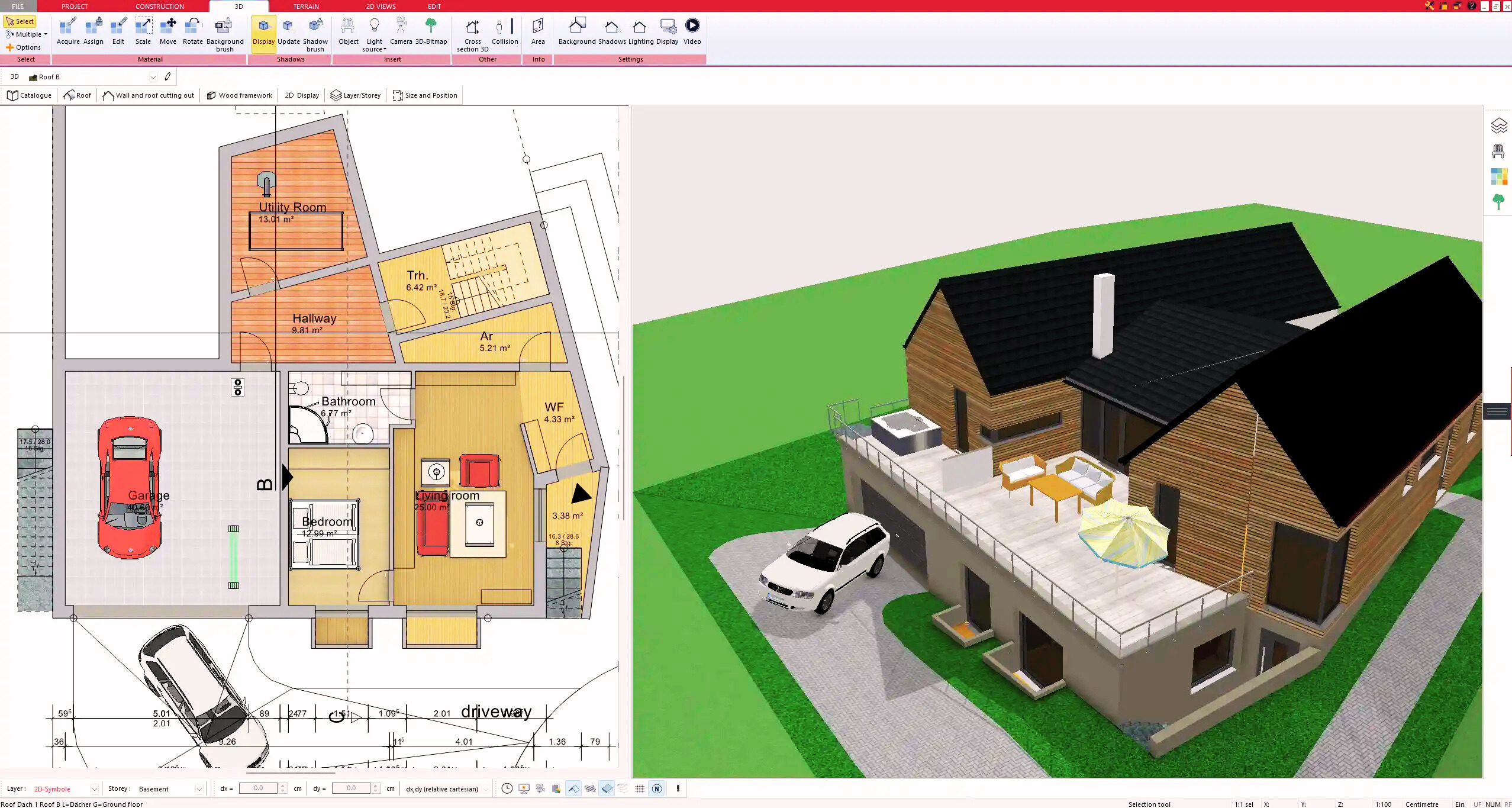
Create your 2D floor plan by accurately drawing and adjusting rooms and walls for your home design.

2. Windows & Doors

Optimize your space layout with perfectly fitting door and window elements.

3. Floors & Roof

Visualize different levels and roof types for your home design.

4. Textures & 3D Objects

Choose materials and textures to customize floors, walls, and 3D objects individually for a realistic representation of your design.

5. Plan for the Building Permit

Sections and views for the building application can be created with Plan7Architect (1)
Create professional construction drawings with elevations, sections, and complete plan compilations.

6. Export the Floor Plan as a 3D Model for Twinmotion
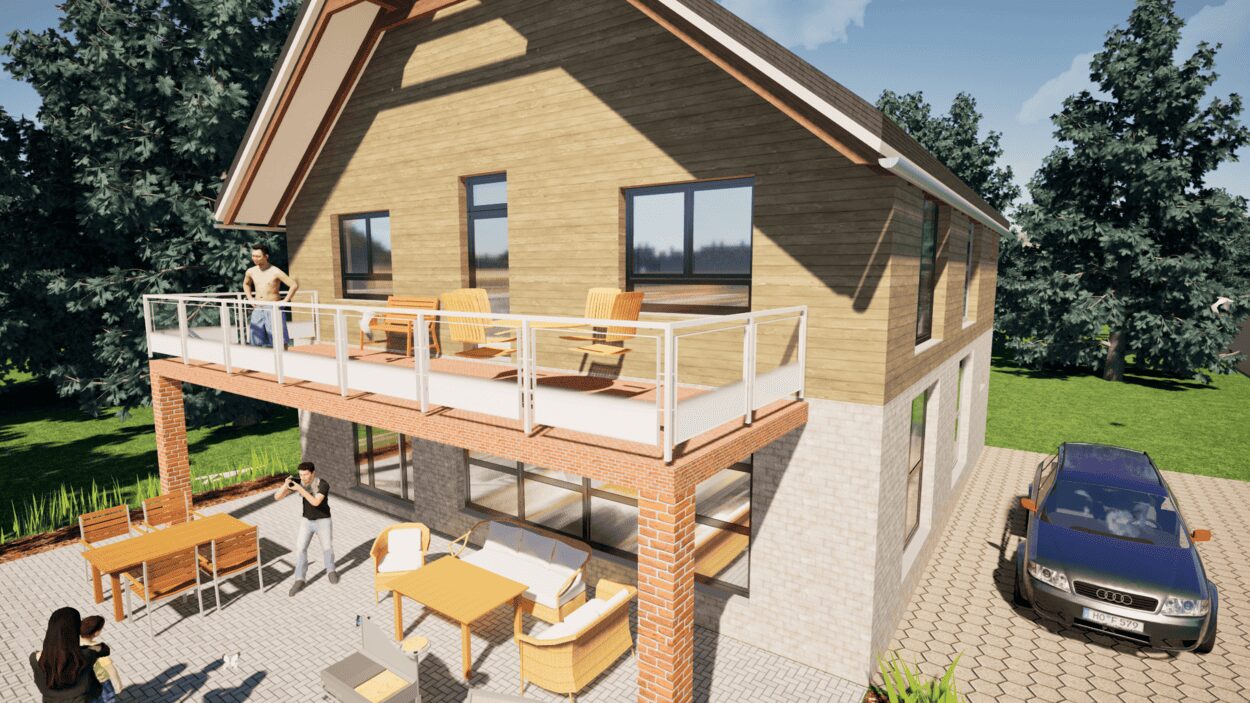
Visualize your project with cutting-edge 3D technology and create high-quality image renderings and videos using Twinmotion by Epic Games.


  • – Compliant with international construction standards
  • – Usable on 3 PCs simultaneously
  • – Option for consultation with an architect
  • – Comprehensive user manual
  • – Regular updates
  • – Video tutorials
  • – Millions of 3D objects available

Why Thousands of Builders Prefer Plan7Architect

Why choose Plan7Architect over other home design tools?

14-Day Money-Back Guarantee
No questions asked. Just email us within 14 days if you’re not satisfied.
One-time payment – no subscription
Own the software forever. No hidden costs. No monthly fees. Updates are optional.
Based on $2,500 professional architecture software
Plan7Architect is an optimized version — used by professionals and private users alike.
Supports international building standards
Adaptable to US, UK, Canadian, Australian, and European requirements.
Works offline – use on up to 3 devices
No internet required. Install on up to 3 computers – ideal for home and office use.
Metric & imperial units
Switch freely between feet/inches or meters/centimeters — perfect for global use.
++
All key export/import formats included
DWG, DXF, OBJ, 3DS, STL, PDF, image export/import, and SketchUp import — for smooth collaboration.
ii
Create real building permit documents
Generate floor plans, elevations, cross-sections, and full construction drawings.
Supports wood framing for walls and roofs
Design wall and roof structures, gables, dormers, and freely constructed wood frameworks.
Easy learning curve with full support
Includes video tutorials, ticket system, detailed PDF manual, sample projects, and access to our customer forum.
Excellent verified reviews
Top ratings on Trusted Shops and Amazon.
Ongoing development – 3–4 updates per year
Always improving, with a modern 3D engine and regular feature upgrades.
Watch how a complete house is planned from start to finish – in under 25 minutes

Detailed House Planning (25 Min)

Small Home Planning Demo (12 Min)

The 3 Plan7Architects

Sale!
Plan7Architect Pro
Original price was: $259.99.Current price is: $109.99.

Verified Customer Reviews

Verified Customer Reviews

Trusted Shops:

Home » Architecture software » Software for Architectural Design & Drawings
Youtube
Select your currency